The Data Liberation Front
The code for this project can be found here.
For my next post, I’d initially planned to analyse some WhatsApp group chats and see what I could deduce about the chat participants and the relationships between them - Ideally something that goes beyond the tools that collect and display statistics like number of messages sent, most active time of day and most used smileys.
Unfortunately, I got side-tracked while trying to collect my raw WhatsApp data, and because I’m way behind on my publishing deadlines, I decided to write about that instead.
Table of Contents:
- WhatsApp - The Good, the Very Good, and the Excellent
- WhatsApp - The Ugly
- The 5 Stages of Grief
- The Solution
- Why?
- Conclusion
- Footnotes
WhatsApp - The Good, the Very Good, and the Excellent
For as long as I can remember, WhatsApp let you easily export your chat in a neat .txt file with just a couple of button clicks. I already had great respect for WhatsApp for several reasons:
- Design: Beautifully minimal.
- Penetration: Whenever I meet a new group of people, WhatsApp groups are the preferred method of communication. Everyone always seems to have and use WhatsApp.
- Erlang: The backend of WhatsApp is written in Erlang. I don’t know why exactly that is impressive, but I do know that Erlang is fucking cool 1. To give you an idea, WhatsApp’s use of Erlang is often touted as the reason they were able to handle over 900M users with only 50 engineers.
- Obvious Features that no one else has figured out: When you send chats on WhatsApp and there’s no signal, WhatsApp will automatically send the chat when the signal resumes! I’m still not sure why Messenger can’t accomplish this.
“Good for WhatsApp!” - I thought. Data portability is just one more thing that these guys handle in a clean, simple and efficient manner! Unfortunately, I was in for a rude shock…
WhatsApp - The Ugly
I don’t remember why, but I decided to export and save down my WhatsApp call logs as well - The more data, the better right? However, on clicking the 3 dots, I couldn’t find the “Export Call Logs” option. At first, I thought ah well, guess WhatsApp isn’t perfect after all - They’ve buried the Export Call Logs button somewhere deep inside the settings window. After a few minutes of poring over the settings, it dawned on me that maybe there is no Export Call Logs option in WhatsApp! I fired off some Google searches, frantically trying to refute this possibility but each empty result cemented it further into a horrifying fact.
The 5 Stages of Grief
Denial: I spent an embarassingly long amount of time convinced that exporting call logs was in fact possible, and that I was just a technologically challenged simpleton that couldn’t figure it out. At some point Googling the exact same phrases again and again gave way to…
Anger: Isn’t data portability the law? Aren’t telecoms obliged to provide to us our call logs under GDPR? What makes WhatsApp different? Why wouldn’t they just provide the call logs anyway? This time, the Zuck had gone way too far. For corrupting the soul of my beloved WhatsApp, he would pay the ultimate price…
Bargaining: I came across some apps that claimed to be able to retrieve the WhatsApp call logs, but the only testimonials I could find were from the creators of the apps themselves. I was not quite ready to hook my WhatsApp up to a shady app I downloaded off some dark corner of the internet. I looked for ways to get the WhatsApp db files from my phone, but these files were encrypted, and it was not clear how to decrypt them (There was an app that claimed to let you do this, but I definitely didn’t want to hook my WhatsApp up to a shady third party crypto app). Maybe I could scrape the data from WhatsApp Web? Nice try, but WhatsApp Web doesn’t even have the “Calls” tab (Why would it?). Is there a way to scrape data from apps? Nope, that is a notoriously difficult problem, and apps like WhatsApp have booby traps built in specifically to prevent scraping…
Depression: The most frustrating part was that the data was right there! In my phone! In theory, I could just scroll through the logs one by one and manually enter the data for each call into a table. All I need to execute that plan is a metric ton of Adderall. Maybe I could build a rig with a robotic arm that would do the scrolling and clicking, and a camera that would take pictures of the screen and extract the data? I actually entertained this idea for about 5 seconds, before remembering that every hardware project I’ve attempted has ended in either abortion, miscarriage or attempted suicide…

Joy Lobo also abandoned his hardware project, but he showed impressive follow through on his suicide attempt
Acceptance Obsession: Unfortunately, acceptance has never been my strong suit. I knew I had to let go, but just like the time Kiran Kapoor called me fartface in front of the entire 6th grade, my mind kept going back to it. The great thing about engineering problems though (As opposed to bitter middle school memories) is that if you keep thinking about them, it sometimes leads to a resolution.
The Solution
The Eureka moment was realizing that I didn’t need a robotic hand or any hardware - I could just mirror my phone screen on my computer and write some code to simulate the actions of scrolling through the call logs and capturing screenshots. Once I had the screenshots, I could use OCR to extract the text data from them and chuck it into a table. Easy right? Right guys?

Guys???
Step 1 - Mirroring my Phone on the Computer
This was easily achieved with a little scrcpy magic - The hardest part of this step was removing the USB cable from my phone charger and connecting it to my computer.
Step 2 - GUI Automation
The next step was figuring out how to control my mouse and keyboard with code. In principle, this was also fairly easy - pyautogui is a great python module that lets you do exactly that. Some of the challenges I faced:
-
The biggest challenge with GUI Automation (Or automation of any kind really) is the inability of the machine to adapt to even the most minor surprises. The machine will keep executing the same instructions, and if something unexpected happens in the middle of that, things could go completely wrong. For example, I received a phone call in the middle of one of my runs, and that threw off the carefully balanced workflow of steps so that the code started saving screenshots of my homescreen again and again (It could’ve been worse). If you try this yourself, switch your phone to flight mode, and don’t leave the machine completely unsupervised; Sit nearby with a book so that you can keep an eye on things.
-
The time interval between pyautogui operations had to be optimised to account for the non-trivial and slightly random latency of GUI functions like switching between windows, or opening up the “Save As” dialog box. I had about 800 call logs to save, and given that I was sitting around watching over the process, I couldn’t afford to spend more than 4 seconds per log.
-
While the whole point of GUI automation was to bypass manual drudgery, there was still the one-time drudgery of figuring out the pixel locations for the mouse clicks in the workflow. To make this process slightly smoother, I called print(pyautogui.position()) in a for loop with a sleep timer, so that it printed out the mouse position at regular intervals. I then positioned the mouse every where I needed it. I also tried to use keyboard shortcuts as much as possible when executing tasks.
-
Finally, I found that in some cases pressing the ‘Enter’ key via pyautogui didn’t work. Someone had written a detailed answer on Stack Overflow as to why this happens, but I only read the answer below that one, which told me to use pydirectinput instead. I used it, it worked, I moved on.
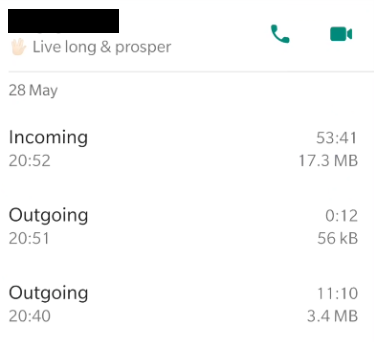
You can find the code I used to perform the screen grabbing here. After running this, I had a folder of images like the following, one for each call log.
Step 3 - Optical Character Recognition
Optical Character Recognition or OCR is the use of technology to distinguish and identify characters in images and convert them to text. It is one of the earliest areas of AI research and there are some truly impressive OCR tools out there today - Two examples that blew me away were Google Lens, which can read in foreign language text from your phone camera and translate in real time, and Mathpix Snip which can be used to generate the Latex code for a mathematical formula.
My use case was a particularly simple one. The text was digitally generated and formatted, not handwritten or in some funky font, and the image itself was a screenshot, not a picture of a physical sheet of paper (Actual pictures are harder because the text is distorted by wrinkles in the paper and the perspective of the lens). Despite all of this, I found that the OCR module I used (pytesseract) did not give perfect results. The two issues that came up were:
Correctness: Given the simplicity of my use case, I was expecting perfect accuracy. However, I still got errors in about 2% of my images. There are ways to boost the accuracy by pre-processing the image, but I adopted the lazy method of going into my phone settings and changing the “Display Size” setting to the largest possible, which removed all but a couple of the errors.
Output Consistency: This was a much more serious problem (Mostly because it forced me to write more code than I’d initially expected to). The format of the string that I received as an output was not consistent across all my images. In some cases, the call type and the duration were part of the same line. In others they were in different lines - The figures below show the 2 main classes of text output I received from the OCR module.
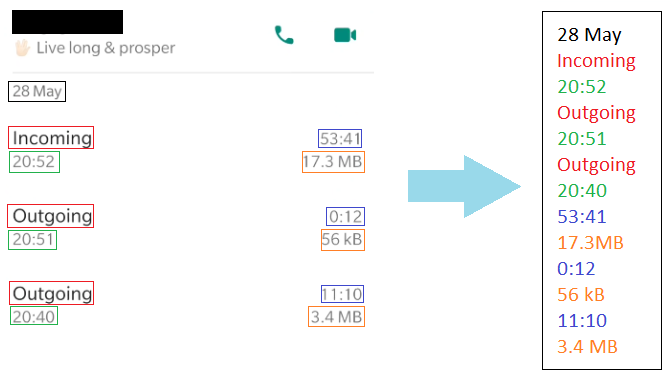
Class 1: Each token printed in a separate line
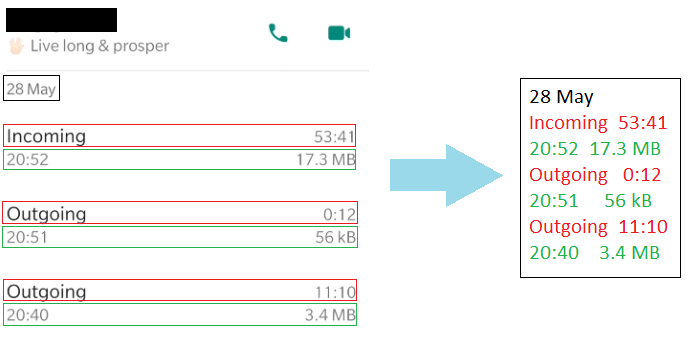
Class 2: Call Type and Duration in the same line, Call Time and Size in the same line
Step 4 - Parsing OCR Text to Structured Data
The eventual goal of the project was to convert the text ouput of the OCR engine for each screenshot into an object of the “Record” class below:
Record:
    Name (string)
    Status (string)
    Date (date)
    Calls (list of calls)
With each call being an object of the following class:
Call:
    cType (Incoming/Outgoing/Missed)
    Time (HH:MM)
    Duration (H:MM:SS/Not answered/Empty(Iff cType == Missed))
    Size ( DD.D MB/ DDD Kb /Empty(Iff cType == Missed OR Duration == Not answered))
As stated in the previous section, the fact that there are 2 different types of text output complicates things. In such cases, the most straightforward solution is what I call the “Waterfall” approach - Parse the text assuming it’s a class 1 output. If that fails, parse it assuming it’s a class 2 output. If that also fails, throw an error. If your code throws a lot of errors, you realise that there are more than 2 classes of outputs, add one more level to your waterfall and repeat the process.
I didn’t quite use the waterfall approach in my code - Never go full waterfall if you can avoid it. However, I did something pretty close to it (You can have a look at my code here). In a nutshell, I checked each line of the input against a list of regular expressions to determine what kind of token it is and then used it’s position relative to the other tokens to insert it into the output structure.
Example: Consider the line L = “19:42”. It matches the regular expression R = [0-9]{2}:[0-9]{2}, that is to say, it is two digits, followed by a colon, followed by two digits. This means that it is either a Call Time or a Call Duration. If the previous line was “333 kB” then we know that this token is preceded by a Call Size, which means it’s a Call Time (Call Durations are never preceded by Call Sizes). Assuming that all tokens are present in the text input in the correct order, we find the first duration-less Call in the output structure, and populate it with 19:42. Once we have processed all elements, we return the resulting output structure.
The most unsatisfying thing about the above approach is that I have made a lot of assumptions about the input, but these assumptions aren’t clearly stated in the code (The only thing worse than people not stating their assumptions is people not knowing what their assumptions are). Further, because the assumptions are baked into the structure of the code, if I want to add/remove/change one of them, I need to restructure the code entirely. Not fun.
Another unsatisfying aspect of this approach is it’s “All or nothing” nature. If the OCR process ommitted the “:” and incorrectly read in the input as “1942”, this code would just throw. It would be nice if we could flag it as corrupted, but still match with the duration token, based on the fact that it’s still a pretty close match to the regexp, and the fact that it comes after a Call Size token.
Sidebar: Probabilistic Approach to Data Extraction
In this section, I’ve tried to flesh out a probabilistic approach to the data extraction problem, that tries to resolve the issues described above. STATUTORY WARNING: This section is speculative and hand-wavy. Consume at your own risk.
In a broad sense, the idea is to represent the state of knowledge about each line of the input, and what kind of token it represents, using a probability distribution. Our knowledge about the format of the input text can be specified with some conditional probabilities, and then it’s just a question of applying Bayesian inference to get the resulting posterior distribution for each line. Once this is done, the maximum probability token for each line can be selected. It might clarify things to view the example above in the context of this approach.
Example: Again, we have the line L = “19:42” and want to figure out what kind of token it is. For simplicity, let us assume we know it is either a Call Duration, a Call Time, or a Call Size, and the prior probability of each possibility is 0.33. We can repesent this state of knowledge with the vector \([0.33, 0.33, 0.33]\)
In order to get the final distribution for each line, we must go through a list of tests. Each test comes with a list of conditional probabilities (The probability of a particular test outcome given that the line is of a particular type) - Given these, the posterior distribution can be inferrred from the test outcome. The tests and the associated conditional probabilities encode our assumptions about how the system behaves.
One such test could be to compare L with the regular expression R = [0-9]{2}:[0-9]{2}. The associated conditional probabilities are:
\(P(L\) matches \(R\) | \(L =\) Duration\()\) = 0.99
\(P(L\) matches \(R\) | \(L =\) Time\()\) = 0.99
\(P(L\) matches \(R\) | \(L =\) Size\()\) = 0.01
We never set any of the probabilities to 1 or 0, becaue there is always a chance that the OCR output was corrupted (Or that we are living in The Matrix).
On applying the test, our probability distribution get’s updated by Baye’s Theorem into \([0.4975, 0.4975, 0.005]\)
Another test could be based on the token type of the previous line. The conditional probabilites in this case are:
\(P(L_{i-1} =\) Size | \(L_i =\) Duration\()\) = 0.5
\(P(L_{i-1} =\) Size | \(L_i =\) Time\()\) = 0.05
\(P(L_{i-1} =\) Size | \(L_i =\) Size\()\) = 0.01
\(P(L_{i-1} =\) Duration | \(L_i =\) Duration\()\) = 0.3
\(P(L_{i-1} =\) Duration | \(L_i =\) Time\()\) = 0.01
\(P(L_{i-1} =\) Duration | \(L_i =\) Size\()\) = 0.6
Let’s say that the inferred posterior distribution for the previous line \(L_{i-1}\) is \([0.05, 0, 0.95]\).
Then we can further update the probability distribution for \(L_i\) as follows:
\(P(L_i) = P(L_i\) | \(L_{i-1} =\) Size\()\)*\(P(L_{i-1} =\) Size\()\) + \(P(L_i\) | \(L_{i-1} =\) Duration\()\)*\(P(L_{i-1} =\) Duration\()\)
where:
\(P(L_i\) | \(L_{i-1}\) = Size) \(\propto P(L_{i-1} =\) Size | \(L_i)\)*\(P(L_i)\)
\(P(L_i\) | \(L_{i-1}\) = Duration) \(\propto P(L_{i-1} =\) Duration | \(L_i)\)*\(P(L_i)\)
The final posterior probability is \([0.9786, 0.0202, 0.0011]\) or a 97.86% chance that the token is a Call Duration.
Advantages over the waterfall
Basically, the probabilistic approach lets us chuck everything we know about the system and all our observations about the current instance into a big pot, and stir it till inferences appear. It makes explicit our expectations and assumptions about how the system is supposed to behave. We can add or remove assumptions by simply adding or removing the corresponding tests. The strength or weakness of these assumptions can be tweaked by changing the actual values of the conditional probabilities. Finally, it gets around the brittleness of the Boolean logic approach - Even if the regular expression doesn’t match perfectly, we can do some kind of fuzzy matching and come up with a probability of match assuming some corruption. If one of the tests fails, the information provided by the other tests could still lead us to the right answer.
Why?
“But datadude, you infuriatingly indirect imbecile”, I hear you say, “Surely there’s a more direct way to fetch this data than to build this Rube Goldberg contraption involving mirroring, GUI automation and OCR?”
I’m the first to admit that there are many shortcomings with the approach I’ve taken. Probably the biggest one is that it isn’t portable - Most people can’t use this approach to get their WhatsApp call logs. Hell, even I probably won’t go through this process on a weekly basis to keep my call records updated! Secondly, there is a lot of ugly ad hocery involved in converting the OCR text into structured data. WhatsApp has this data in a neat table somewhere inside it, and if you’re looking for something clean and scalable, hunting down that table is the only way.
Why then did I do it this way? It just seemed more fun and horizon-broadening! I’ve thought about both GUI automation and structured data extraction in different contexts before, and this seemed like a good project to play around with these concepts.
Conclusion
I don’t think data portability is anyone’s top concern right now, but I think that will soon change. At the moment, a lot of companies seem to be getting away with shoddy, or non-existent data portability solutions. When consumers start rightfully demanding their data, I don’t think these companies will meekly hand it over - We will probably need to resort to creative tactics to get it. Even if they do hand over the data, it will have to converted from the structured format they use into the structured formats that each of us wants, and that isn’t an easy problem.
The battle to get my call logs out of WhatsApp was a microcosm of the upcoming Portability Wars and to be honest, I had a lot of fun fighting it! Still, I live in the hope that WhatsApp will see the error of their ways and just add the damn “Extract Call Logs” button, so we can all move on to bigger and better things.
Footnotes
-
Some day, I’ll figure out exactly why Erlang is so cool (Right after I finish reading The Art of Computer Programming, Structure and Interpretation of Computer Programs and the Escher and Bach parts of GEB) ↩
Comments
This was both super impressive and super entertaining! Did you do any validation of the records to see how accurate the OCR+parsing was? I’d be curious to know how well it worked :)
Good problem solving skills never thought of mirroring phone screen and integrating it with OCR
Wow wow wow, hard to stop reading this one, once you have fallen into start reading trap.
Well written, data dude. Look forward to the gossip in the next post
That was entertaining and enlightening - A much more interesting project would be pdf parsing btw.. especially to extract tabular data.
Pdf parsing is much easier and much less interesting
Really fun read, Rube Goldberg contraptions are fun, especially if there are no moving parts to fail. Perhaps a solution to regularly updating the call logs is to have an applet that triggers when you put your phone to charge at night, putting your phone into airplane mode, and then start logging.
Enlarging the font size was a good hack to get over the limitations of OCR
Woaah…never thought there could be so much to call logs on WhatsApp. Good analysis and witty humour. Kudos to the effort! All in all in a good read
Super fun read 😁 Had to read the sidebar twice 😂
Moar plz