<?xml version="1.0" encoding="utf-8"?><feed xmlns="http://www.w3.org/2005/Atom" ><generator uri="https://jekyllrb.com/" version="3.10.0">Jekyll</generator><link href="https://lordvaider.github.io/feed.xml" rel="self" type="application/atom+xml" /><link href="https://lordvaider.github.io/" rel="alternate" type="text/html" /><updated>2024-12-20T17:45:32+00:00</updated><id>https://lordvaider.github.io/feed.xml</id><title type="html">Adventures of a Wannabe Datadude</title><subtitle>One man&apos;s journey to understand his own data</subtitle><entry><title type="html">R.I.P. Timeline on Desktop - FAQ for the Normals</title><link href="https://lordvaider.github.io/2024/12/20/RIP-Timeline-Normal-FAQ.html" rel="alternate" type="text/html" title="R.I.P. Timeline on Desktop - FAQ for the Normals" /><published>2024-12-20T00:00:00+00:00</published><updated>2024-12-20T00:00:00+00:00</updated><id>https://lordvaider.github.io/2024/12/20/RIP%20Timeline%20Normal%20FAQ</id><content type="html" xml:base="https://lordvaider.github.io/2024/12/20/RIP-Timeline-Normal-FAQ.html"><![CDATA[<p>I woke up a few months ago to the upsetting news that Google is sunsetting the Timeline on Desktop feature.</p>

<p>I was furious about this change, but when I tried to communicate my outrage to the folks around me, I was met with blank stares and shrugged shoulders. Most people around me didn’t seem to even know that the Timeline feature existed and hence had no idea what the change to this feature implied.</p>

<p>This an evangelical post - Basically my attempt to explain to an intelligent (and skeptical) Normal <sup id="fnref:1" role="doc-noteref"><a href="#fn:1" class="footnote" rel="footnote">1</a></sup>, what Timeline is and why it matters.</p>

<p><strong>Normal:</strong> Lets start from basics - What is timeline?</p>

<p><strong>Datadude:</strong> I think you mean Timeline.</p>

<p><strong>N:</strong> Sigh… Ok dude, what is Timeline?</p>

<p><strong>D:</strong> Every few seconds your phone sends it’s GPS coordinates to one of Google’s servers. This data is recorded and processed by Google. You can view a historic record of that data using the Google Maps Web app and check where you were physically located at any point in time over the past `n' years.</p>

<p><strong>N:</strong> Wow I had no idea - That’s kinda cool!</p>

<p><strong>D:</strong> Yeah, it’s very cool!</p>

<p>Unfortunately, a surprisingly large number of people are not aware of the existence of Timeline - Many people I know didn’t switch it on and their data was not even recorded.</p>

<p>Of the ones who have it switched on, a large fraction know of it’s existence on an abstract level, but have never actually explored it in a meaningful way.</p>

<p><strong>N:</strong> Ok I’ll bite - How do I see my Timeline?</p>

<p>It used to be that you could open up your Timeline on any device you are logged into your Google account on. By using a service called Google Takeout, you could also download a json file containing your entire Timeline history data.</p>

<p>Going forth Google is making a change where the Timeline data will all live on your mobile device and not be maintained on their servers - You will have an option to keep an encrypted backup on their servers, but this is for the purpose of maintaining Timeline continuity when you change your mobile device. There have been complaints from several users who have lost decades of data due to dark patterns and weird bugs in this migration process.</p>

<p><strong>N:</strong> Hmm ok, so I spent like 5 mins playing around with this… Now what? I mean you can geek out over this data all you want, but can you bottom line it for me? What’s the point of it?</p>

<p>The way I see it, there are a few different answers to that question.</p>

<h3 id="sentimental-answer">Sentimental answer:</h3>
<p>What is the point of a photo album? Maybe I’m just weird, but retracing my physical journeys is a great way to reminisce about my holiday or even some siginificant date in my past.</p>

<p>In this vein, I came across the following <a href="https://chan.co.za/how-fateful">project by Chan Perry</a>, who used her and her boyfriend’s data to figure out the number of times they could’ve potentially met before they actually did.</p>

<h3 id="practical-answer">Practical answer:</h3>
<p>For the non-sentimental hardasses among you here are some practical uses:</p>

<ol>
  <li>I wrote a whole <a href="https://lordvaider.github.io/2024/05/26/Travel-History.html">blog post</a> about how I leveraged Timeline data to fill out onerous visa application forms.</li>
  <li><a href="https://www.mileagewise.com/">Mileagewise</a> allows you to use your Timeline data in the US to claim tax rebates!</li>
  <li>J.S. Morin writes that he uses Timeline as an “<a href="https://www.jsmorin.com/2023/07/google-maps-Timeline-the-argument-killing-machine/">argument killing machine</a>”. Being able to save time and/or money is one thing, but nothing compares to the rush of being able to whip out your phone and conclusively prove your spouse wrong about something.</li>
  <li>Figuring out what credit card items mean - Sometimes I will be going through my credit card statement and see a weird entry from a couple of weeks ago that I don’t recognize. Fortunately I can use Timeline to look up where I was on that date and figure out that this is the holding company that owns the restaurant I ate at on that day.</li>
  <li>In a similiar vein to 4. I was able to find the name of a quaint little restaurant I dined at in Milan, while I was on a trip there a couple of years ago.</li>
</ol>

<p>Who knows what the future holds? Having this data might pay off in unexpected ways at some point and even if it doesn’t, it’s better to have it and not need it than otherwise.</p>

<h3 id="philosophical-answer">Philosophical answer:</h3>
<p>I saved the best (And most controversial) argument for the end. There is a certain point of view that the human mind is a computational process - A self-propagating, dynamic collection of data and patterns <sup id="fnref:2" role="doc-noteref"><a href="#fn:2" class="footnote" rel="footnote">2</a></sup>. Death is the erasure of those patterns from the universe. For most of human history these computational patterns - The essence of who we are - were confined to our brains. In today’s age however, significant chunks of our memories and identities exist externally in digital exobrains - Our laptops, mobile devies and other digital extensions of our minds.</p>

<p>Taken to it’s logical conclusion, this viewpoint dictates that deleting a significant chunk of your digitally stored patterns is like suffering brain damage, or even a small-scale death! If that seems far-fetched to you, imagine how you’d feel if all existing digital photos of you were <em>irrecoverably</em> deleted?</p>

<p>Your Google Timeline is a high resolution projection of your computational process and it’s incredibly special that you have access to it (Unlike most humans that have ever lived). To lose it would be to let a piece of yourself fade into oblivion. Do not go gentle into that good night!</p>

<p>Understanding this point will also help you understand the outrage around this move in certain internet circles - It’s as if Google is casually committing data genocide, and no one seems to care.</p>

<p><strong>N:</strong> Woah, when did this turn into a Black Mirror episode? The philosophical stuff seems a bit far-fetched to me, but if this data is as potentially useful as you say, isn’t it dangerous for me to let Google have a copy? Aren’t I better off not saving it with them?</p>

<p>Look, at this point, we’ve all signed away our lives to our tech overlords. If they want to, they could squash you like a cockroach with or without your Timeline data. Saving it down just means that you have access to the data yourself and can use it for your own ends if you ever want to.</p>

<p><strong>N:</strong> Ok I think you’ve successfully Pascal wager-ed me into it - Even if this data is functionally worthless to me at this moment, it costs nothing to save it down and have it in case it becomes useful later on. Is there a detailed guide somewhere on the internet that gives me step by step instructions on how to proceed with the Timeline migration?</p>

<p><strong>D:</strong> Fear not my friend, the Datadude has you covered. Now that you’re (somewhat) convinced of the importance of your Timeline data, you can proceed to my FAQ for converts to learn exactly the steps you must take in order to safely migrate to the new version of Timeline without losing your data.</p>

<h1 id="footnotes">Footnotes</h1>
<div class="footnotes" role="doc-endnotes">
  <ol>
    <li id="fn:1" role="doc-endnote">
      <p>I hope that readers will appreciate my use of the judgement-free “Normal” rather than the pejorative “Normie”. <a href="#fnref:1" class="reversefootnote" role="doc-backlink">&#8617;</a></p>
    </li>
    <li id="fn:2" role="doc-endnote">
      <p>This perspective is far less controversial today than it was decades ago when pioneers of Artificial Intelligence declared that the brain was “merely a meat machine.” In the age of Artifical Intelligence, this idea has seeped into public consciousness and some would even call it obviously true. Yet, it remains one of the foundational concepts in computer science, intimately tied to the Church-Turing thesis and the simulation hypothesis. By liberating us from the dogma of any single computational substrate, it reminds us that, in the end, “it’s Turing machines all the way down.” For an exploration of the mind-bending possibilities that arise from this idea, I highly recommend Permutation City by Greg Egan. <a href="#fnref:2" class="reversefootnote" role="doc-backlink">&#8617;</a></p>
    </li>
  </ol>
</div>]]></content><author><name></name></author><summary type="html"><![CDATA[I woke up a few months ago to the upsetting news that Google is sunsetting the Timeline on Desktop feature.]]></summary></entry><entry><title type="html">IKB - Subarray Sum</title><link href="https://lordvaider.github.io/2024/11/18/Irodov-Ka-Baap-Problem-3.html" rel="alternate" type="text/html" title="IKB - Subarray Sum" /><published>2024-11-18T00:00:00+00:00</published><updated>2024-11-18T00:00:00+00:00</updated><id>https://lordvaider.github.io/2024/11/18/Irodov-Ka-Baap-Problem-3</id><content type="html" xml:base="https://lordvaider.github.io/2024/11/18/Irodov-Ka-Baap-Problem-3.html"><![CDATA[<h1 id="problem">Problem</h1>
<p>You are given two integer arrays \(A\) and \(B\), such that \(|A| = n\) and \(|B| = m\). Further all elements of \(A\) are in the range \([ 1, \cdots, m ]\) and all elements of \(B\) are in the range \([ 1, \cdots, n ]\).</p>

<p>Prove that there exist non-empty subarrays of \(A\) and \(B\) that have the same sum.</p>]]></content><author><name></name></author><summary type="html"><![CDATA[Problem You are given two integer arrays \(A\) and \(B\), such that \(|A| = n\) and \(|B| = m\). Further all elements of \(A\) are in the range \([ 1, \cdots, m ]\) and all elements of \(B\) are in the range \([ 1, \cdots, n ]\).]]></summary></entry><entry><title type="html">IKB - Span of a Tetrahedron</title><link href="https://lordvaider.github.io/2024/11/11/Irodov-Ka-Baap-Problem-2.html" rel="alternate" type="text/html" title="IKB - Span of a Tetrahedron" /><published>2024-11-11T00:00:00+00:00</published><updated>2024-11-11T00:00:00+00:00</updated><id>https://lordvaider.github.io/2024/11/11/Irodov-Ka-Baap-Problem-2</id><content type="html" xml:base="https://lordvaider.github.io/2024/11/11/Irodov-Ka-Baap-Problem-2.html"><![CDATA[<h1 id="problem">Problem</h1>
<p>For a set \(E\) in \(R^3\), let \(L(E)\) consist of all points on all lines determined by any two points of \(E\).</p>

<p>More formally, define \(L(E)\) as:</p>

<p>$
\hspace{1cm} L(E) = \bigcup_{{p, q} \subset E} \ell(p, q),
$</p>

<p>where \(\ell(p, q) = \{ (1-t)p + tq : t \in \mathbb{R} \}\) is the line passing through the points \(p\) and \(q\).</p>

<p>Thus if \(V\) consists of the four vertices of a regular tetrahedron, then \(L(V)\) consists of the six edges of the tetrahedron, extended infinitely in both directions.</p>

<p>Does \(L(L(V))\) span all of \(R^3\)?</p>

<h1 id="solution">Solution</h1>
<p>I originally saw this problem in <a href="https://stanwagon.com/wagon/misc/bestpuzzles.html">Stan Wagon’s problem collection</a> (That link is worth book-marking for every puzzle enthusiast). He credits Victor Klee with creating this problem. Klee was one of those badass geometers who had a fully functional amusement park inside his brain. Among his many achievements, the ones I understood and was impressed by are proposing the Art Gallery Problem and showing that the worst case runtime of the Simplex method is exponential.</p>

<p>This problem is one of those beauties that befuddles experienced mathematicians, but that can be solved by a layperson with good enough geometric intuition. The solution below relies on this fact, as I don’t have the patience to write the full blown algebraic proof.</p>

<p>Firstly, we note that the set \(L(V)\) is just the 6 edges of the tetrahedron, extended to infinity on both sides.</p>

<p>Let’s label these lines \(E_{12}, E_{13}, E_{14}, E_{23}, E_{24}, E_{34}\). (A line is named in correspondence with the 2 vertices of the tetrahedron it passes through)</p>

<p>If 2 lines are co-planar, the span of those lines can only include the plane containing those lines. If we want to fill space, we must focus on the skew lines.</p>

<p>In the set above, there are 3 pairs of skew lines - \((E_{12}, E_{34}), (E_{14}, E_{23})\) and \((E_{13}, E_{24})\).</p>

<p>Let’s focus one of these pairs - Convince yourself that the set \(L(E_x, E_y\)) contains all points in \(R^3\), except for two planes - The plane containing \(E_y\) and parallel to \(E_x\) and the plane containing \(E_x\) and parallel to \(E_y\).</p>

<p>If you’re having difficulty visualizing this, you can use the fact that such a pair of skew lines can be rotated to the lines \(E_{12}: x=0, z=0\) and \(E_{34}: x=1, y=0\) and then prove algebraically that you can attain all \((x, y, z)\) as linear combinations of points on these lines EXCEPT for the ones where \(x=0, z \neq 0\) and \(x=1, y \neq 0\).</p>

<p>For each pair of skew lines, we get a pair of parallel planes that is NOT in the image of of \(L(E_x, E_y)\). The intersections of these pairs of planes give us 4 points that are not in the image \(L(L(V))\).</p>

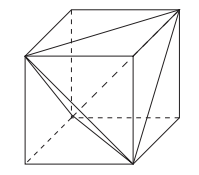
<p>Is there a succint way to describe these points? One of my favourite professors used to say that whenever you encounter a regular tetrahedron, one potentially fruitful avenue is to inscribe it in a cube. If you have a cube with vertices \(\in \{0, 1\}^3\), then you can inscribe in it the regular tetrahedron with vertices \((0, 0, 0), (0, 1, 1), (1, 0, 1)\) and \((1, 1, 0)\). The points not in \(L(L(V))\) are then exactly the 4 remaining vertices of the cube.</p>

<p><img src="/images/2024-11-11/tetrahedron.png" alt="png" /></p>
<p style="text-align: center;">
<i> When life gives you a tetrahedron, inscribe it in a cube</i>
</p>]]></content><author><name></name></author><summary type="html"><![CDATA[Problem For a set \(E\) in \(R^3\), let \(L(E)\) consist of all points on all lines determined by any two points of \(E\).]]></summary></entry><entry><title type="html">Irodov Ka Baap - Origins</title><link href="https://lordvaider.github.io/2024/11/06/Irodov-Ka-Baap-Origins.html" rel="alternate" type="text/html" title="Irodov Ka Baap - Origins" /><published>2024-11-06T00:00:00+00:00</published><updated>2024-11-06T00:00:00+00:00</updated><id>https://lordvaider.github.io/2024/11/06/Irodov-Ka-Baap-Origins</id><content type="html" xml:base="https://lordvaider.github.io/2024/11/06/Irodov-Ka-Baap-Origins.html"><![CDATA[<p>I have been interested in solving, creating and curating math puzzles since high school. This tendency has helped me crack competitive exams, clear job interviews and make friends with loads of interesting people. Starting in high school, I began compiling a collection of my favourite problems and gave it the tongue-in-cheek title “Irodov ka Baap”.</p>

<p>Some background here for readers who don’t know - <strong>“Problems in General Physics” by I.E. Irodov</strong> was a book that nerdy Indian teenagers venerated, feared and adored. It was one of the classic preparation resources for the IIT JEE (An annual entrance exam which is the gateway to the prestigious Indian Institutes of Technology) and every serious aspirant proudly owned a copy that was dog-eared and worn out from frequent use (I used the past tense because things have probably changed since I gave the exam).</p>

<p><img src="/images/2024-11-06/irodov.png" alt="png" /></p>
<p style="text-align: center;">
<i> My personal copy looked _much_ more beaten up</i>
</p>

<p>In Hindi, the literal meaning of the phrase “X ka baap” is “X’s father”, and colloquially it is used to denote something far superior to X. Hence the title “Irodov Ka Baap” was my way of claiming that my (yet to be written) book was far superior to a book beloved by several generations of my country’s most brilliant students. To answer your question, yes, 18 year old me was an insufferable prick with delusions of grandeur.</p>

<p>I actually took IKB further along than most of my projects - I even managed to sell an early draft for Rs. 50k! Over the years, the contents changed to reflect my changing tastes - The physics puzzles got swapped out with probability and discrete math but like the Ship of Theseus, I retained the name of my beloved collection. Unfortunately, I was never able to publish - The act of writing my thoughts down in a satisfactory way proved to be surprisingly hard. As time went on, my core interest in puzzles started waning. My puzzle friends were re-directing their mental bandwidth towards excelling in their careers, or having babies or going insane. My own mental bandwidth proved insufficient for such lofty goals, and was exhausted in trying to unentangle the tedious, bureaucratic mazes adults are required to run through.</p>

<p>Recently however, life came full circle for me. In the course of helping some high schoolers prepare for the <a href="https://artofproblemsolving.com/wiki/index.php/AMC_12_Problems_and_Solutions">AMC</a>, I revisited the old neural pathways and rediscovered the dormant joy of puzzle solving. I decided to make use of this momentum to write down some of my favourite puzzles for the internet audience. The hope is to post a new puzzle each day for as long as I can. Links to all the problems will be aggregated below.</p>

<p>The solution for the previous days puzzle will be posted alongwith the puzzle for the next day.</p>

<p>P.S. A small fraction of you reading this are probably saying “BTW Irodov ka baap already exists, it’s called Aptitude Test Problems in Physics by SS Krotov”. To you I say, well done my friend! I doubt any one else in your life gave a fuck when you told them you had read and solved Krotov (No one did in mine) but today you got to feel smug for a few seconds and isn’t that what life is all about?</p>]]></content><author><name></name></author><summary type="html"><![CDATA[I have been interested in solving, creating and curating math puzzles since high school. This tendency has helped me crack competitive exams, clear job interviews and make friends with loads of interesting people. Starting in high school, I began compiling a collection of my favourite problems and gave it the tongue-in-cheek title “Irodov ka Baap”.]]></summary></entry><entry><title type="html">IKB - The Impossible Problem, Version 1729.0</title><link href="https://lordvaider.github.io/2024/11/06/Irodov-Ka-Baap-Problem-1.html" rel="alternate" type="text/html" title="IKB - The Impossible Problem, Version 1729.0" /><published>2024-11-06T00:00:00+00:00</published><updated>2024-11-06T00:00:00+00:00</updated><id>https://lordvaider.github.io/2024/11/06/Irodov-Ka-Baap-Problem-1</id><content type="html" xml:base="https://lordvaider.github.io/2024/11/06/Irodov-Ka-Baap-Problem-1.html"><![CDATA[<h1 id="puzzle">Puzzle</h1>

<p>Two infinitely intelligent and truthful mathematicians \(P\) and \(Q\) meet to play a game. Each of them individually decides on a secret real number greater than 1. (\(P\)’s number is \(p\) and \(Q\)’s number is \(q\)) They submit their numbers to a moderator M, who reveals to both of them the product pq, along with another number \(r\). M doesn’t reveal which number is \(pq\) and which number is \(r\). This entire setup is common knowledge between \(P\) and \(Q\), i.e. they both know the setup and know that the other knows the setup etc.</p>

<p>M then turns to \(P\) and asks him if he knows q. If \(P\) says no, he asks \(Q\) if he knows p. If \(Q\) says no, he then asks \(P\) again, and so on. Prove that this game terminates after a finite number of rounds.</p>

<h1 id="solution-updated-11nov24">Solution (Updated 11Nov24):</h1>

<p>This problem belongs to a category of puzzles that exploit the logical concept of <a href="https://en.wikipedia.org/wiki/Common_knowledge_(logic)">Common Knowledge</a>. These puzzles explore how shared knowledge, and the ability to deduce information based on what others know, can lead to surprising and often counterintuitive conclusions. Famous examples include the <a href="https://terrytao.wordpress.com/2008/02/05/the-blue-eyed-islanders-puzzle/">Blue-Eyed Islander Puzzle</a> and the many variants of the <a href="https://en.wikipedia.org/wiki/Sum_and_Product_Puzzle">Impossible Puzzle</a>. If you haven’t encountered these before, they are well worth exploring as quintessential examples of the genre. Also worth reading is Scott Alexander’s DELIGHTFUL <a href="https://slatestarcodex.com/2015/10/15/it-was-you-who-made-my-blue-eyes-blue/">short story</a> exploring the puzzle from the point of view of the islanders.</p>

<p>At first glance, such puzzles can feel perplexing or even paradoxical. A common reaction is, “Where is the new information coming from?” After all, for progress to be made, the participants \(P\) and \(Q\) must gain new insights with each round, even though no additional explicit information is revealed. This leads to the realization that the source of this “new” information is not external but emerges from the participants’ reasoning about each other’s reasoning.</p>

<p>The key to unraveling these puzzles is understanding that:</p>

<p>1) \(P\) and \(Q\) are infinitely intelligent and that</p>

<p>2) They are both aware of the setup.</p>

<p>This means in any given situation they can make all logically possible deductions and know that other participants can do the same. Therefore, the lack of immediate deductions becomes itself a crucial source of information. For example, if \(P\) doesn’t know the answer in the first round, it implies that certain conditions must hold for \(Q\), allowing \(Q\) to refine their possibilities—and vice versa.</p>

<p>With this in mind, let us systematically track the information that both participants have in each round.</p>

<p><strong>Start of the game</strong>:</p>

<p>At the start of the game, both \(P\) and \(Q\) see 2 numbers \(a\) and \(b\) (Without loss of generality, \(a &lt; b\)). Hence we have:</p>

<table>
  <thead>
    <tr>
      <th><strong>P’s Knowledge</strong></th>
      <th><strong>Q’s Knowledge</strong></th>
    </tr>
  </thead>
  <tbody>
    <tr>
      <td>\(q = \frac{a}{b} \text{ OR } q = \frac{b}{a}\)</td>
      <td>\(p = \frac{a}{b} \text{ OR } p = \frac{b}{a}\)</td>
    </tr>
    <tr>
      <td>\(q &gt; 1\)</td>
      <td>\(p &gt; 1\)</td>
    </tr>
  </tbody>
</table>

<p><strong>Round 1, Question 1:</strong></p>

<p>If \(\frac{a}{p} &lt; 1\), \(P\) can immediately eliminate it and knows that \(q = \frac{b}{p}\)</p>

<p>Conversely, if \(P\) cannot immediately identify \(q\), this must imply \(\frac{a}{p} &gt; 1 \implies p &lt; a\).</p>

<p>Hence if \(P\) answers <strong>No</strong> in the first round, \(Q\)’s knowledge gets updated as following:</p>

<table>
  <thead>
    <tr>
      <th><strong>P’s Knowledge</strong></th>
      <th><strong>Q’s Knowledge</strong></th>
    </tr>
  </thead>
  <tbody>
    <tr>
      <td>\(q = \frac{a}{b} \text{ OR } q = \frac{b}{a}\)</td>
      <td>\(p = \frac{a}{b} \text{ OR } p = \frac{b}{a}\)</td>
    </tr>
    <tr>
      <td>\(q &gt; 1\)</td>
      <td>\(1 &lt; p &lt; a\)</td>
    </tr>
  </tbody>
</table>

<p><strong>Round 1, Question 2:</strong></p>

<p>If \(\frac{b}{q} &gt; a\), \(Q\) can immediately deduce \(p\).</p>

<p>Conversely, if \(Q\) cannot deduce \(p\), this must imply \(\frac{b}{q} &lt; a \implies q &gt; \frac{b}{a}\).</p>

<p>Hence if \(Q\) answers <strong>No</strong> in the first round, \(P\)’s knowledge gets updated as follows</p>

<table>
  <thead>
    <tr>
      <th><strong>P’s Knowledge</strong></th>
      <th><strong>Q’s Knowledge</strong></th>
    </tr>
  </thead>
  <tbody>
    <tr>
      <td>\(q = \frac{a}{b} \text{ OR } q = \frac{b}{a}\)</td>
      <td>\(p = \frac{a}{b} \text{ OR } p = \frac{b}{a}\)</td>
    </tr>
    <tr>
      <td>\(q &gt; \frac{a}{b}\)</td>
      <td>\(1 &lt; p &lt; a\)</td>
    </tr>
  </tbody>
</table>

<p>As we can see, after one round, \(P\)’s lower bound for \(q\) increased from \(1\) to \(\frac{b}{a}\). Continuing in this manner, we can see that after the \(n^{th}\) round \(P\)’s lower bound for \(q\) increases to \(\left( \frac{b}{a} \right)^n\).</p>

<p>Similarly, \(Q\)’s upper bound for \(p\) at the end of the \(n^{th}\) round decreases to \(a \cdot \left( \frac{a}{b} \right)^n\)</p>

<p>Hence it’s clear that sooner or later, one of them will deduce the other’s number.</p>]]></content><author><name></name></author><summary type="html"><![CDATA[Puzzle]]></summary></entry><entry><title type="html">Google Timeline Analysis (Finally Something Useful)</title><link href="https://lordvaider.github.io/2024/05/26/Travel-History.html" rel="alternate" type="text/html" title="Google Timeline Analysis (Finally Something Useful)" /><published>2024-05-26T00:00:00+00:00</published><updated>2024-05-26T00:00:00+00:00</updated><id>https://lordvaider.github.io/2024/05/26/Travel-History</id><content type="html" xml:base="https://lordvaider.github.io/2024/05/26/Travel-History.html"><![CDATA[<p>Last year, I had to submit a large form with my travel history outside of UK.</p>

<p>The normie approach would be to sit down with your passport and a large cup of coffee, note down each stamp and figure out when the corresponding flight was - Yuck. Further, the UK doesn’t stamp your passport on the way out, so that leaves you with edge cases (If you arrived in Bangkok on 17th May, did you leave the UK on the 16th or the 17th?) - Such edge cases would have to be resolved by tracking down the corresponding flight ticket in your inbox. Double Yuck.</p>

<p>The Type A personality approach would be to maintain an ongoing spreadsheet of your travel history that you update at fixed intervals (Along with the spreadsheets that track your investments, the expiry dates of all your medications and the last known locations of all your sworn enemies). Triple mega ultra YUCK.</p>

<p>This seemed like a prime opportunity for a datadude revival post. Google has been stalking my physical location for years and it was finally time for me to extract some value from that. I downloaded the relevant files from Google Takeout and I was ready to go.</p>

<h2 id="takeout-choices---raw-or-processed">Takeout Choices - Raw or Processed?</h2>

<p>Google gives you your history in 2 formats.</p>

<p><strong>Raw Data:</strong> A giant list where each entry is (Point in time, Point in space). This is the physicist’s <a href="https://en.wikipedia.org/wiki/World_line">worldline</a> - Your life is just a discontinuous curve moving through 3-dimensional spacetime (The discontinuities are the times your phone wasn’t online and 3-D because Google maps doesn’t store your spatial z co-ordinate).</p>

<p>The great thing about this format is the data schema is as simple as it can get. This has many advantages, including maximal data portability - Integrating your Google worldline and your Apple Maps worldline is a simple matter of list concatenation.</p>

<p>The bad part is you have to do all the data crunching. There are also some weird issues that crop up when using the raw data - For eg. soon after I moved to the UK, there is a patch in my raw data that shows my physical position as alternating between London and Mumbai. I suspsect this is because I was logged in to my Google account on both, my PC in my parent’s home and my cellphone, and my position was being recorded from both devices simultaneously.</p>

<p><strong>Semantic Format:</strong> Here Google uses it’s world-class, cutting edge algos and armies of highly paid data scientists to slap some meaningful labels on the raw worldline data. At a high level, your location history is divided into placeVisits (Where you spend some time stationary at location X) and activitySegment (Where you travel between location X and Y).</p>

<p>Each placeVisit contains information like the coordinates of the place visited, the duration spent there, the address as inferred by Google etc. Each activitySegment has information like the start and end coordinates, the path followed and the inferred mode of transport for that edge.</p>

<p>The problem with these is that the datamodel is complicated and varies over time. For example, in my semantic data, each activitySegment contains a field ‘activities’, which is a probability distribution over the possible modes of transport that activity involved. Now most (But not all) activitySegments also contain a field called ‘activityType’, which is assigned value of the most likely activity in the list. Hence any solution that uses the ‘activityType’ field may miss some information. Without an official dictionary from Google clearly fleshing out what these fields mean, we are forced to rely on our common sense to make sense of these fields, and while that is good enough for most cases, it will certainly not cover all cases.</p>

<p>Further, Google will sometimes fuck up the tagging of activitySegments (like the time they thought I cycled from Lucknow to Mumbai in 2 hours). For the most part however, they are probably doing a better job of cleaning up and interpreting this data than I can.</p>

<h2 id="approach-1---rawdogging-data-costly-api-calls-simplifying-assumptions">Approach 1 - Rawdogging data, Costly API calls, Simplifying assumptions</h2>

<p>Given the above, it seemed that if we want a Google proof solution (In terms of being immune to both, their sloppy data processing <em>and</em> their potential future bankruptcy from class action lawsuits filed by <a href="https://www.reddit.com/r/google/comments/1cziil6/a_rock_a_day_keeps_the_doctor_away/">rock-eaters</a>), the most reliable way is to use the raw worldline. Further, for the task I had in mind, the solution seemed super simple - For each point on the worldline, map it to the corresponding country. Find all the points in time when the country changes and Boom - You have your travel history table.</p>

<p><strong>Problem with this approach</strong>: Mapping from (Latitude, Longitude) → Country is an expensive function call. The raw data contains a point every 15-20 seconds, so that translates to a lot of points.  In 3000 days of history, I had a 15 million raw data points. The really dumb approach of simply mapping each raw datapoint to a country is waaaaay too slow. Maybe we could do something cleverer like form a small number of clusters (1000?), map each cluster to a country and then use that to label raw points? It could work, but it’s not foolproof by any means and relies on a complex algo. I’m a lazy fucker who hates complexity so I decided to think some more before going down this route.</p>

<p><strong>Exploiting Timeline gaps:</strong> The approach I took was to use the fact that the data is already naturally clustered - As I stated earlier, the worldline is discontinuous whenever my cellphone is not online and these gaps cluster the raw data in a natural way - The insight is to realise that most country changes occur during such gaps. This is because:</p>

<ol>
  <li>I mostly travel between countries by flight - This is specially true for travel in and out of the UK.</li>
  <li>There is a gap in my location history while I’m flying as data connectivity is lost (I never access WiFi on the plane, not sure how this would be affected if I did).</li>
</ol>

<p>Now there will obviously be some discontinuities which were not travel related - Maybe my phone ran out of battery, or I didn’t have connectivity, but that’s OK - By focussing just on the timeline gaps, we massively reduce the number of points we need to reverse map. We can further cut down the points by prioritizing the biggest gaps first.</p>

<p><strong>Final Approach:</strong> So what I did is</p>
<ol>
  <li>Evaluate the physical distance between consecutive points in the worldline (I used the <a href="https://en.wikipedia.org/wiki/Haversine_formula">Haversine metric</a>, just to show off more than anything else).</li>
  <li>Reverse-sorted and got the consecutive worldline points with the largest distance between them. These are the gaps.</li>
  <li>Applied a sensible threshold cutoff - 500 kms seems like a good lower bound for international flights.</li>
  <li>Mapped the remaining few hundred points to coun
tries</li>
  <li>Filtered down to the gaps where start_country != end_country</li>
</ol>

<p>And voila! I had a table of all my international travels.</p>

<p><strong>Comments</strong>: This solution works for me (And one other super-lazy friend who I sent my jupyter notebook to) but will the underlying assumptions hold for everyone? Certainly it won’t capture the country changes for Europeans that routinely drive/take trains across country borders. Will it work for the perenially online fucks who check their emails while on international flights? This solution won’t work for a lot of people and that is unsatisfying. On the plus side, it uses the raw data, and the code and logic is extremely simple - The only complicated bit is the country lookup and we outsource that to an API.</p>

<h2 id="approach-2---processed-data-only">Approach 2 - Processed Data only</h2>

<p>Chronologically, this was the first approach that I took to solve this problem - In this case I used the semantic data and went through the following steps:</p>

<ol>
  <li>Isolated the activitySegments tagged as FLIGHTS,</li>
  <li>Looked at the placeVisits before and after those FLIGHT Segments,</li>
  <li>Extracted the airport name from the address of the placeVisits</li>
  <li>Manually compiled a mapping of which airport was in which country.</li>
</ol>

<p><strong>Comments</strong>: This approach was pretty stupid, and I would’ve been better off mapping the start and end locations of the FLIGHT segments using the country lookup. I also spent way too much time at this step figuring out the meaning of random useless fields in the structured data, how they were related to one another and if the data was internally consistent (Was the startTime of each activitySegment AFTER the endTime of the previous activitySegment?)</p>

<h2 id="other-approaches">Other approaches</h2>

<p>This idea is obvious enough that a few other people have implemented their own versions of it:</p>

<ol>
  <li><a href="https://janlauge.github.io/2021/google_timeline_travel_history/">Laurens Geffert</a>: One of the aforementioned highly talented Google data scientists - His solution is kind of a mix of my 2 approaches - He whittled down the space of points required by focussing on the processed data and then mapped it using a country lookup. I suspect the API he used to do the country lookups was also much more performant than the one I used (I just used whatever ChatGPT recommended). I should add here that, like me, he also performed a sanity check of the results and manually removed a few obviously nonsensical datapoints.</li>
</ol>

<p>If Laurens has already solved the problem, why blog my solution?  Well I could give you reasons like I used a different algorithm or that it’s implemented in python instead of R, but mostly it’s because because Peter Campbell is my spirit animal.</p>

<p><img src="/images/2024-05-26/campbell.png" alt="png" /></p>
<p style="text-align: center;">
<i>Yeah, you tell 'em Pete!</i>
</p>
<ol>
  <li><a href="https://geoprocessing.online/">Geoprocessing</a>: This company lets you upload your timeline data and then helps you with various analyses. I didn’t want to upload my data anywhere so haven’t experimented with this.</li>
  <li><a href="https://www.mileagewise.com/">Mileagewise</a>: They use Google timeline data to create mileage logs (In the US you can claim tax benefits by claiming the mileage incurred while driving around as a business expense) This is a very different usecase from the one considered here, but I threw it in because it’s an ingenious use of timeline data.</li>
</ol>

<h2 id="conclusion">Conclusion</h2>

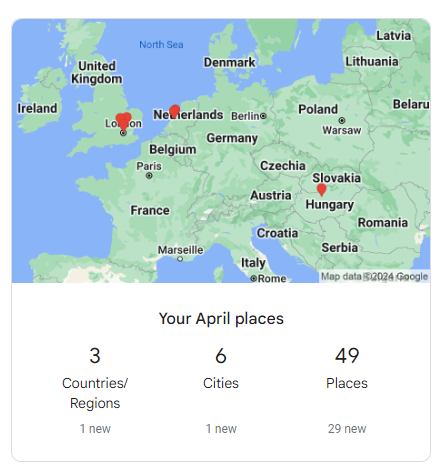
<p>The most devastating criticism of the quantified-self subculture is that the projects seldom have tangible value - Pretty graphs that show your travel locations on a map or analytics that count how many cities/countries you visited last month may be interesting, but <strong>they are not actionable in any meaningful way</strong>. This is why most people don’t bother with the Timeline digest mail that you receive from Google every month - Who gives a fuck?</p>

<p><img src="/images/2024-05-26/timeline_digest.PNG" alt="png" /></p>

<p style="text-align: center;">
<i>Looks like Google's data scientists exercised as much creativity in designing this digest as the guys who named their geographic data processing company Geoprocessing</i>
</p>

<p>This project shows that you can extract value from your personal data in a simple and direct way. As with any project, a quick and dirty first cut will handle 80% of the cases  but a solution which addresses all the edge cases presented by all of humanity is beyond the scope of a blog post project hacked together in a few hours. However, I hope that at least a few readers will be able to save a couple of hours of tedious effort by leveraging this code to fill out their own travel history forms!</p>]]></content><author><name></name></author><summary type="html"><![CDATA[Last year, I had to submit a large form with my travel history outside of UK.]]></summary></entry><entry><title type="html">The Data Liberation Front</title><link href="https://lordvaider.github.io/2021/06/21/Data-Liberation-Front.html" rel="alternate" type="text/html" title="The Data Liberation Front" /><published>2021-06-21T00:00:00+00:00</published><updated>2021-06-21T00:00:00+00:00</updated><id>https://lordvaider.github.io/2021/06/21/Data-Liberation-Front</id><content type="html" xml:base="https://lordvaider.github.io/2021/06/21/Data-Liberation-Front.html"><![CDATA[<p><em>The code for this project can be found <a href="https://github.com/lordvaider/whatsappscraper">here</a>.</em></p>

<p>For my next post, I’d initially planned to analyse some WhatsApp group chats and see what I could deduce about the chat participants and the relationships between them - Ideally something that goes beyond the tools that collect and display statistics like number of messages sent, most active time of day and most used smileys.</p>

<p>Unfortunately, I got side-tracked while trying to collect my raw WhatsApp data, and because I’m way behind on my publishing deadlines, I decided to write about that instead.</p>

<p><strong>Table of Contents:</strong></p>

<ul id="markdown-toc">
  <li><a href="#whatsapp---the-good-the-very-good-and-the-excellent" id="markdown-toc-whatsapp---the-good-the-very-good-and-the-excellent">WhatsApp - The Good, the Very Good, and the Excellent</a></li>
  <li><a href="#whatsapp---the-ugly" id="markdown-toc-whatsapp---the-ugly">WhatsApp - The Ugly</a></li>
  <li><a href="#the-5-stages-of-grief" id="markdown-toc-the-5-stages-of-grief">The 5 Stages of Grief</a></li>
  <li><a href="#the-solution" id="markdown-toc-the-solution">The Solution</a>    <ul>
      <li><a href="#step-1---mirroring-my-phone-on-the-computer" id="markdown-toc-step-1---mirroring-my-phone-on-the-computer">Step 1 - Mirroring my Phone on the Computer</a></li>
      <li><a href="#step-2---gui-automation" id="markdown-toc-step-2---gui-automation">Step 2 - GUI Automation</a></li>
      <li><a href="#step-3---optical-character-recognition" id="markdown-toc-step-3---optical-character-recognition">Step 3 - Optical Character Recognition</a></li>
      <li><a href="#step-4---parsing-ocr-text-to-structured-data" id="markdown-toc-step-4---parsing-ocr-text-to-structured-data">Step 4 - Parsing OCR Text to Structured Data</a>        <ul>
          <li><a href="#sidebar-probabilistic-approach-to-data-extraction" id="markdown-toc-sidebar-probabilistic-approach-to-data-extraction">Sidebar: Probabilistic Approach to Data Extraction</a></li>
          <li><a href="#advantages-over-the-waterfall" id="markdown-toc-advantages-over-the-waterfall">Advantages over the waterfall</a></li>
        </ul>
      </li>
    </ul>
  </li>
  <li><a href="#why" id="markdown-toc-why">Why?</a></li>
  <li><a href="#conclusion" id="markdown-toc-conclusion">Conclusion</a></li>
  <li><a href="#footnotes" id="markdown-toc-footnotes">Footnotes</a></li>
</ul>

<h1 id="whatsapp---the-good-the-very-good-and-the-excellent">WhatsApp - The Good, the Very Good, and the Excellent</h1>

<p>For as long as I can remember, WhatsApp let you easily export your chat in a neat .txt file with just a couple of button clicks. I already had great respect for WhatsApp for several reasons:</p>
<ul>
  <li><strong>Design:</strong> Beautifully minimal.</li>
  <li><strong>Penetration</strong>: Whenever I meet a new group of people, WhatsApp groups are the preferred method of communication. Everyone always seems to have and use WhatsApp.</li>
  <li><strong>Erlang</strong>: The backend of WhatsApp is written in Erlang. I don’t know why exactly that is impressive, but I do know that Erlang is fucking cool <sup id="fnref:1" role="doc-noteref"><a href="#fn:1" class="footnote" rel="footnote">1</a></sup>. To give you an idea, WhatsApp’s use of Erlang is often touted as the reason they were able to handle over 900M users with only 50 engineers.</li>
  <li><strong>Obvious Features that no one else has figured out</strong>: When you send chats on WhatsApp and there’s no signal, WhatsApp will automatically send the chat when the signal resumes! I’m still not sure why Messenger can’t accomplish this.</li>
</ul>

<p>“Good for WhatsApp!” - I thought. Data portability is just one more thing that these guys handle in a clean, simple and efficient manner! Unfortunately, I was in for a rude shock…</p>

<h1 id="whatsapp---the-ugly">WhatsApp - The Ugly</h1>

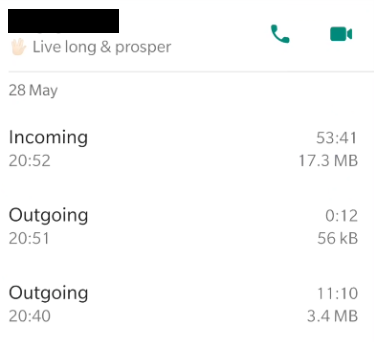
<p>I don’t remember why, but I decided to export and save down my WhatsApp call logs as well - The more data, the better right? However, on clicking the 3 dots, I couldn’t find the “Export Call Logs” option. At first, I thought ah well, guess WhatsApp isn’t perfect after all - They’ve buried the Export Call Logs button somewhere deep inside the settings window. After a few minutes of poring over the settings, it dawned on me that maybe <em>there is no Export Call Logs option in WhatsApp!</em> I fired off some Google searches, frantically trying to refute this possibility but each empty result cemented it further into a horrifying fact.</p>

<h1 id="the-5-stages-of-grief">The 5 Stages of Grief</h1>

<p><strong>Denial</strong>: I spent an embarassingly long amount of time convinced that exporting call logs was in fact possible, and that I was just a technologically challenged simpleton that couldn’t figure it out. At some point Googling the exact same phrases again and again gave way to…</p>

<p><strong>Anger</strong>: Isn’t data portability the law? Aren’t telecoms obliged to provide to us our call logs under <a href="https://gdpr-info.eu/">GDPR</a>? What makes WhatsApp different? Why wouldn’t they just provide the call logs anyway? This time, the Zuck had gone way too far. For corrupting the soul of my beloved WhatsApp, he would pay the ultimate price…</p>

<p><strong>Bargaining</strong>: I came across some apps that claimed to be able to retrieve the WhatsApp call logs, but the only testimonials I could find were from the creators of the apps themselves. I was not quite ready to hook my WhatsApp up to a shady app I downloaded off some dark corner of the internet. I looked for ways to get the WhatsApp db files from my phone, but these files were encrypted, and it was not clear how to decrypt them (There was an app that claimed to let you do this, but I <em>definitely</em> didn’t want to hook my WhatsApp up to a shady third party <em>crypto</em> app). Maybe I could scrape the data from WhatsApp Web? Nice try, but WhatsApp Web doesn’t even have the “Calls” tab (Why would it?). Is there a way to scrape data from apps? Nope, that is a notoriously difficult problem, and apps like WhatsApp have booby traps built in specifically to prevent scraping…</p>

<p><strong>Depression</strong>: The most frustrating part was that the data was right there! In my phone! In theory, I could just scroll through the logs one by one and manually enter the data for each call into a table. All I need to execute that plan is a metric ton of Adderall. Maybe I could build a rig with a robotic arm that would do the scrolling and clicking, and a camera that would take pictures of the screen and extract the data? I actually entertained this idea for about 5 seconds, before remembering that every hardware project I’ve attempted has ended in either abortion, miscarriage or attempted suicide…</p>

<p><img src="/images/2020-06-21/joylobo.PNG" alt="png" /></p>

<p style="text-align: center;">
<i><a href="https://3idots.fandom.com/wiki/Joy_Lobo">Joy Lobo</a> also abandoned his hardware project, but he showed impressive follow through on his suicide attempt</i>
</p>

<p><b><s>Acceptance</s> Obsession</b>: Unfortunately, acceptance has never been my strong suit. I knew I had to let go, but just like the time Kiran Kapoor called me fartface in front of the entire 6th grade, my mind kept going back to it. The great thing about engineering problems though (As opposed to bitter middle school memories) is that if you keep thinking about them, it sometimes leads to a resolution.</p>

<h1 id="the-solution">The Solution</h1>
<p>The Eureka moment was realizing that I didn’t need a robotic hand or any hardware - I could just mirror my phone screen on my computer and write some code to simulate the actions of scrolling through the call logs and capturing screenshots. Once I had the screenshots, I could use OCR to extract the text data from them and chuck it into a table. Easy right? Right guys?</p>

<p><img src="/images/2020-06-21/tumbleweed.gif" alt="gif" /></p>

<p style="text-align: center;">
<i>Guys???</i>
</p>

<h2 id="step-1---mirroring-my-phone-on-the-computer">Step 1 - Mirroring my Phone on the Computer</h2>
<p>This was easily achieved with a little <a href="https://github.com/Genymobile/scrcpy">scrcpy</a> magic - The hardest part of this step was removing the USB cable from my phone charger and connecting it to my computer.</p>

<h2 id="step-2---gui-automation">Step 2 - GUI Automation</h2>
<p>The next step was figuring out how to control my mouse and keyboard with code. In principle, this was also fairly easy - <a href="https://pyautogui.readthedocs.io/en/latest/index.html">pyautogui</a> is a great python module that lets you do exactly that. Some of the challenges I faced:</p>

<ol>
  <li>
    <p>The biggest challenge with GUI Automation (Or automation of any kind really) is the inability of the machine to adapt to even the most minor surprises. The machine will keep executing the same instructions, and if something unexpected happens in the middle of that, things could go completely wrong. For example, I received a phone call in the middle of one of my runs, and that threw off the carefully balanced workflow of steps so that the code started saving screenshots of my homescreen again and again (It could’ve been worse). If you try this yourself, switch your phone to flight mode, and don’t leave the machine completely unsupervised; Sit nearby with a book so that you can keep an eye on things.</p>
  </li>
  <li>
    <p>The time interval between pyautogui operations had to be optimised to account for the non-trivial and slightly random latency of GUI functions like switching between windows, or opening up the “Save As” dialog box. I had about 800 call logs to save, and given that I was sitting around watching over the process, I couldn’t afford to spend more than 4 seconds per log.</p>
  </li>
  <li>
    <p>While the whole point of GUI automation was to bypass manual drudgery, there was still the one-time drudgery of figuring out the pixel locations for the mouse clicks in the workflow. To make this process slightly smoother, I called print(pyautogui.position()) in a for loop with a sleep timer, so that it printed out the mouse position at regular intervals. I then positioned the mouse every where I needed it. I also tried to use keyboard shortcuts as much as possible when executing tasks.</p>
  </li>
  <li>
    <p>Finally, I found that in some cases pressing the ‘Enter’ key via pyautogui didn’t work. Someone had written a detailed answer on Stack Overflow as to why this happens, but I only read the answer below that one, which told me to use <a href="https://pypi.org/project/PyDirectInput/">pydirectinput</a> instead. I used it, it worked, I moved on.</p>
  </li>
</ol>

<p>You can find the code I used to perform the screen grabbing <a href="https://github.com/lordvaider/whatsappscraper/blob/main/imgscraper.py">here</a>. After running this, I had a folder of images like the following, one for each call log.</p>

<p><img src="/images/2020-06-21/Example1.PNG" alt="png" /></p>

<h2 id="step-3---optical-character-recognition">Step 3 - Optical Character Recognition</h2>
<p>Optical Character Recognition or OCR is the use of technology to distinguish and identify characters in images and convert them to text. It is one of the earliest areas of AI research and there are some truly impressive OCR tools out there today - Two examples that blew me away were Google Lens, which can read in foreign language text from your phone camera and translate in real time, and Mathpix Snip which can be used to generate the Latex code for a mathematical formula.</p>

<p>My use case was a particularly simple one. The text was digitally generated and formatted, not handwritten or in some funky font, and the image itself was a screenshot, not a picture of a physical sheet of paper (Actual pictures are harder because the text is distorted by wrinkles in the paper and the perspective of the lens). Despite all of this, I found that the OCR module I used (<a href="https://pypi.org/project/pytesseract/">pytesseract</a>) did not give perfect results. The two issues that came up were:</p>

<p><strong>Correctness</strong>: Given the simplicity of my use case, I was expecting perfect accuracy. However, I still got errors in about 2% of my images. There are ways to boost the accuracy by pre-processing the image, but I adopted the lazy method of going into my phone settings and changing the “Display Size” setting to the largest possible, which removed all but a couple of the errors.</p>

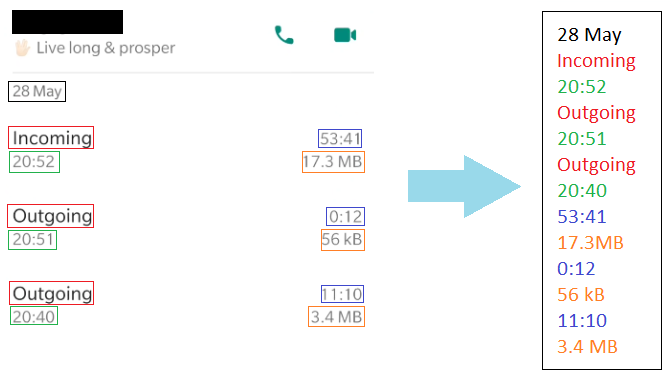
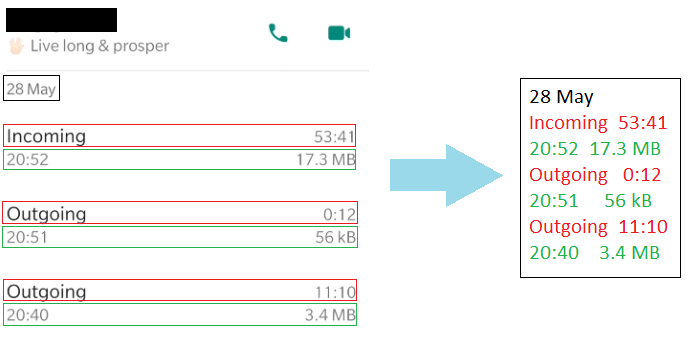
<p><strong>Output Consistency</strong>: This was a much more serious problem (Mostly because it forced me to write more code than I’d initially expected to). The format of the string that I received as an output was not consistent across all my images. In some cases, the call type and the duration were part of the same line. In others they were in different lines - The figures below show the 2 main classes of text output I received from the OCR module.</p>

<p><img src="/images/2020-06-21/Template1.PNG" alt="png" /></p>

<p style="text-align: center;">
<i><b>Class 1:</b> Each token printed in a separate line</i>
</p>

<p><img src="/images/2020-06-21/Template2.PNG" alt="png" /></p>

<p style="text-align: center;">
<i><b>Class 2:</b> Call Type and Duration in the same line, Call Time and Size in the same line</i>
</p>

<h2 id="step-4---parsing-ocr-text-to-structured-data">Step 4 - Parsing OCR Text to Structured Data</h2>
<p>The eventual goal of the project was to convert the text ouput of the OCR engine for each screenshot into an object of the “Record” class below:</p>

<div class="language-plaintext highlighter-rouge"><div class="highlight"><pre class="highlight"><code>Record:
    Name (string)
    Status (string)
    Date (date)
    Calls (list of calls)
</code></pre></div></div>

<p>With each call being an object of the following class:</p>

<div class="language-plaintext highlighter-rouge"><div class="highlight"><pre class="highlight"><code>Call:
    cType (Incoming/Outgoing/Missed)
    Time (HH:MM)
    Duration (H:MM:SS/Not answered/Empty(Iff cType == Missed))
    Size ( DD.D MB/ DDD Kb /Empty(Iff cType == Missed OR Duration == Not answered))
</code></pre></div></div>

<p>As stated in the previous section, the fact that there are 2 different types of text output complicates things. In such cases, the most straightforward solution is what I call the “Waterfall” approach - Parse the text assuming it’s a class 1 output. If that fails, parse it assuming it’s a class 2 output. If that also fails, throw an error. If your code throws a lot of errors, you realise that there are more than 2 classes of outputs, add one more level to your waterfall and repeat the process.</p>

<p>I didn’t quite use the waterfall approach in my code - Never go full waterfall if you can avoid it. However, I did something pretty close to it (You can have a look at my code <a href="https://github.com/lordvaider/whatsappscraper/blob/main/imgprocessor.py">here</a>). In  a nutshell, I checked each line of the input against a list of regular expressions to determine what kind of token it is and then used it’s position relative to the other tokens to insert it into the output structure.</p>

<p><strong>Example</strong>: Consider the line L = “19:42”. It matches the regular expression R = [0-9]{2}:[0-9]{2}, that is to say, it is two digits, followed by a colon, followed by two digits. This means that it is either a Call Time or a Call Duration. If the previous line was “333 kB” then we know that this token is preceded by a Call Size, which means it’s a Call Time (Call Durations are never preceded by Call Sizes). Assuming that all tokens are present in the text input in the correct order, we find the first duration-less Call in the output structure, and populate it with 19:42. Once we have processed all elements, we return the resulting output structure.</p>

<p>The most unsatisfying thing about the above approach is that I have made a lot of assumptions about the input, but these assumptions aren’t clearly stated in the code (The only thing worse than people not stating their assumptions is people not knowing what their assumptions are). Further, because the assumptions are baked into the structure of the code, if I want to add/remove/change one of them, I need to restructure the code entirely. Not fun.</p>

<p>Another unsatisfying aspect of this approach is it’s “All or nothing” nature. If the OCR process ommitted the “:” and incorrectly read in the input as “1942”, this code would just throw. It would be nice if we could flag it as corrupted, but still match with the duration token, based on the fact that it’s still a pretty close match to the regexp, and the fact that it comes after a Call Size token.</p>

<h3 id="sidebar-probabilistic-approach-to-data-extraction">Sidebar: Probabilistic Approach to Data Extraction</h3>

<p>In this section, I’ve tried to flesh out a probabilistic approach to the data extraction problem, that tries to resolve the issues described above. <strong>STATUTORY WARNING</strong>: This section is speculative and hand-wavy. Consume at your own risk.</p>

<p>In a broad sense, the idea is to represent the state of knowledge about each line of the input, and what kind of token it represents, using a probability distribution. Our knowledge about the format of the input text can be specified with some conditional probabilities, and then it’s just a question of applying Bayesian inference to get the resulting posterior distribution for each line. Once this is done, the maximum probability token for each line can be selected. It might clarify things to view the example above in the context of this approach.</p>

<p><strong>Example:</strong> Again, we have the line L = “19:42” and want to figure out what kind of token it is. For simplicity, let us assume we know it is either a Call Duration, a Call Time, or a Call Size, and the prior probability of each possibility is 0.33. We can repesent this state of knowledge with the vector \([0.33, 0.33, 0.33]\)</p>

<p>In order to get the final distribution for each line, we must go through a list of tests. Each test comes with a list of conditional probabilities (The probability of a particular test outcome given that the line is of a particular type) - Given these, the posterior distribution can be inferrred from the test outcome. The tests and the associated conditional probabilities encode our assumptions about how the system behaves.</p>

<p>One such test could be to compare L with the regular expression R = [0-9]{2}:[0-9]{2}. The associated conditional probabilities are:</p>

<p>\(P(L\) matches \(R\) | \(L =\) Duration\()\) = 0.99</p>

<p>\(P(L\) matches \(R\) | \(L =\) Time\()\) = 0.99</p>

<p>\(P(L\) matches \(R\) | \(L =\) Size\()\) = 0.01</p>

<p>We never set any of the probabilities to 1 or 0, becaue there is <a href="https://www.lesswrong.com/posts/QGkYCwyC7wTDyt3yT/0-and-1-are-not-probabilities">always a chance</a> that the OCR output was corrupted (Or that we are living in The Matrix).</p>

<p>On applying the test, our probability distribution get’s updated by Baye’s Theorem into \([0.4975, 0.4975, 0.005]\)</p>

<p>Another test could be based on the token type of the previous line. The conditional probabilites in this case are:</p>

<p>\(P(L_{i-1} =\) Size | \(L_i =\) Duration\()\) = 0.5</p>

<p>\(P(L_{i-1} =\) Size | \(L_i =\) Time\()\) = 0.05</p>

<p>\(P(L_{i-1} =\) Size | \(L_i =\) Size\()\) = 0.01</p>

<p>\(P(L_{i-1} =\) Duration | \(L_i =\) Duration\()\) = 0.3</p>

<p>\(P(L_{i-1} =\) Duration | \(L_i =\) Time\()\) = 0.01</p>

<p>\(P(L_{i-1} =\) Duration | \(L_i =\) Size\()\) = 0.6</p>

<p>Let’s say that the inferred posterior distribution for the previous line \(L_{i-1}\) is \([0.05, 0, 0.95]\).</p>

<p>Then we can further update the probability distribution for \(L_i\) as follows:</p>

<p>\(P(L_i) = P(L_i\) | \(L_{i-1} =\) Size\()\)*\(P(L_{i-1} =\) Size\()\) + \(P(L_i\) | \(L_{i-1} =\) Duration\()\)*\(P(L_{i-1} =\) Duration\()\)</p>

<p>where:</p>

<p>\(P(L_i\) | \(L_{i-1}\) = Size) \(\propto P(L_{i-1} =\) Size | \(L_i)\)*\(P(L_i)\)</p>

<p>\(P(L_i\) | \(L_{i-1}\) = Duration) \(\propto P(L_{i-1} =\) Duration | \(L_i)\)*\(P(L_i)\)</p>

<p>The final posterior probability is \([0.9786, 0.0202, 0.0011]\) or a 97.86% chance that the token is a Call Duration.</p>

<h3 id="advantages-over-the-waterfall">Advantages over the waterfall</h3>
<p>Basically, the probabilistic approach lets us chuck everything we know about the system and all our observations about the current instance into a big pot, and stir it till inferences appear. It makes explicit our expectations and assumptions about how the system is supposed to behave. We can add or remove assumptions by simply adding or removing the corresponding tests. The strength or weakness of these assumptions can be tweaked by changing the actual values of the conditional probabilities. Finally, it gets around the brittleness of the Boolean logic approach - Even if the regular expression doesn’t match perfectly, we can do some kind of fuzzy  matching and come up with a probability of match assuming some corruption. If one of the tests fails, the information provided by the other tests could still lead us to the right answer.</p>

<h1 id="why">Why?</h1>
<p>“But datadude, you infuriatingly indirect imbecile”, I hear you say, “Surely there’s a more direct way to fetch this data than to build this Rube Goldberg contraption involving mirroring, GUI automation and OCR?”</p>

<p>I’m the first to admit that there are many shortcomings with the approach I’ve taken. Probably the biggest one is that it isn’t portable - Most people can’t use this approach to get their WhatsApp call logs. Hell, even I probably won’t go through this process on a weekly basis to keep my call records updated! Secondly, there is a lot of ugly ad hocery involved in converting the OCR text into structured data. WhatsApp has this data in a neat table somewhere inside it, and if you’re looking for something clean and scalable, hunting down that table is the only way.</p>

<p>Why then did I do it this way? It just seemed more fun and horizon-broadening! I’ve thought about both GUI automation and structured data extraction in different contexts before, and this seemed like a good project to play around with these concepts.</p>

<h1 id="conclusion">Conclusion</h1>
<p>I don’t think data portability is anyone’s top concern right now, but I think that will soon change. At the moment, a lot of companies seem to be getting away with <a href="https://chrislukic.com/2021/06/16/techniques-to-prevent-adoption-of-your-api/">shoddy</a>, or <a href="https://www.alias.dev/report">non-existent</a> data portability solutions. When consumers start rightfully demanding their data, I don’t think these companies will meekly hand it over - We will probably need to resort to creative tactics to get it. Even if they do hand over the data, it will have to converted from the structured format they use into the structured formats that each of us wants, and that isn’t an easy problem.</p>

<p>The battle to get my call logs out of WhatsApp was a microcosm of the upcoming Portability Wars and to be honest, I had a lot of fun fighting it! Still, I live in the hope that WhatsApp will see the error of their ways and just add the damn “Extract Call Logs” button, so we can all move on to bigger and better things.</p>

<h1 id="footnotes">Footnotes</h1>
<div class="footnotes" role="doc-endnotes">
  <ol>
    <li id="fn:1" role="doc-endnote">
      <p>Some day, I’ll figure out exactly why Erlang is so cool (Right after I finish reading <a href="https://en.wikipedia.org/wiki/The_Art_of_Computer_Programming">The Art of Computer Programming</a>, <a href="https://mitpress.mit.edu/sites/default/files/sicp/full-text/book/book.html">Structure and Interpretation of Computer Programs</a> and the Escher and Bach parts of <a href="https://en.wikipedia.org/wiki/G%C3%B6del,_Escher,_Bach">GEB</a>) <a href="#fnref:1" class="reversefootnote" role="doc-backlink">&#8617;</a></p>
    </li>
  </ol>
</div>

<hr />

<section class="comments" id="comment-section">
  <hr />
  
  <!-- Existing comments -->
  <div class="comments__existing">
    <h2>Comments</h2>
    
    
    <!-- List main comments in reverse date order, newest first. List replies in date order, oldest first. -->


<article id="comment-52ed12f0-f566-11eb-b046-cb952d21a941" class="js-comment comment" uid="52ed12f0-f566-11eb-b046-cb952d21a941">

  <div class="comment__author">Ben,
    <span class="comment__date"><a href="#comment-52ed12f0-f566-11eb-b046-cb952d21a941" title="Permalink to this comment">August  4th, 2021 20:55</a></span>
  </div>

  <div class="comment__body">
    <p>This was both super impressive and super entertaining! Did you do any validation of the records to see how accurate the OCR+parsing was? I’d be curious to know how well it worked :)</p>

  </div>


    <div class="comment__meta">
      <a rel="nofollow" class="comment__reply-link" onclick="return addComment.moveForm('comment-52ed12f0-f566-11eb-b046-cb952d21a941', 'respond', 'Data-Liberation-Front', '52ed12f0-f566-11eb-b046-cb952d21a941')">↪&#xFE0E; Reply to Ben</a>
    </div>
</article>
  

  <hr style="border-top: 1px solid #ccc; background: transparent; margin-bottom: 10px;" />


<article id="comment-4a2e1800-dc19-11eb-b636-e919e2498f77" class="js-comment comment" uid="4a2e1800-dc19-11eb-b636-e919e2498f77">

  <div class="comment__author">Saatvik Gulati,
    <span class="comment__date"><a href="#comment-4a2e1800-dc19-11eb-b636-e919e2498f77" title="Permalink to this comment">July  3th, 2021 16:11</a></span>
  </div>

  <div class="comment__body">
    <p>Good problem solving skills never thought of mirroring phone screen and integrating it with OCR</p>

  </div>


    <div class="comment__meta">
      <a rel="nofollow" class="comment__reply-link" onclick="return addComment.moveForm('comment-4a2e1800-dc19-11eb-b636-e919e2498f77', 'respond', 'Data-Liberation-Front', '4a2e1800-dc19-11eb-b636-e919e2498f77')">↪&#xFE0E; Reply to Saatvik Gulati</a>
    </div>
</article>
  

  <hr style="border-top: 1px solid #ccc; background: transparent; margin-bottom: 10px;" />


<article id="comment-7c4424b0-d886-11eb-8e4f-a7e8cb5c6f40" class="js-comment comment" uid="7c4424b0-d886-11eb-8e4f-a7e8cb5c6f40">

  <div class="comment__author">BB,
    <span class="comment__date"><a href="#comment-7c4424b0-d886-11eb-8e4f-a7e8cb5c6f40" title="Permalink to this comment">June 29th, 2021 03:02</a></span>
  </div>

  <div class="comment__body">
    <p>Wow wow wow, hard to stop reading this one, once you have fallen into start reading trap.</p>

  </div>


    <div class="comment__meta">
      <a rel="nofollow" class="comment__reply-link" onclick="return addComment.moveForm('comment-7c4424b0-d886-11eb-8e4f-a7e8cb5c6f40', 'respond', 'Data-Liberation-Front', '7c4424b0-d886-11eb-8e4f-a7e8cb5c6f40')">↪&#xFE0E; Reply to BB</a>
    </div>
</article>
  

  <hr style="border-top: 1px solid #ccc; background: transparent; margin-bottom: 10px;" />


<article id="comment-e42750c0-d741-11eb-ba1e-61a0b9d9f058" class="js-comment comment" uid="e42750c0-d741-11eb-ba1e-61a0b9d9f058">

  <div class="comment__author">CasualCaveman,
    <span class="comment__date"><a href="#comment-e42750c0-d741-11eb-ba1e-61a0b9d9f058" title="Permalink to this comment">June 27th, 2021 12:19</a></span>
  </div>

  <div class="comment__body">
    <p>Well written, data dude. Look forward to the gossip in the next post</p>

  </div>


    <div class="comment__meta">
      <a rel="nofollow" class="comment__reply-link" onclick="return addComment.moveForm('comment-e42750c0-d741-11eb-ba1e-61a0b9d9f058', 'respond', 'Data-Liberation-Front', 'e42750c0-d741-11eb-ba1e-61a0b9d9f058')">↪&#xFE0E; Reply to CasualCaveman</a>
    </div>
</article>
  

  <hr style="border-top: 1px solid #ccc; background: transparent; margin-bottom: 10px;" />


<article id="comment-9309a9f0-d448-11eb-bfeb-75431f5a3772" class="js-comment comment" uid="9309a9f0-d448-11eb-bfeb-75431f5a3772">

  <div class="comment__author">Ankit,
    <span class="comment__date"><a href="#comment-9309a9f0-d448-11eb-bfeb-75431f5a3772" title="Permalink to this comment">June 23th, 2021 17:29</a></span>
  </div>

  <div class="comment__body">
    <p>That was entertaining and enlightening - A much more interesting project would be pdf parsing btw.. especially to extract tabular data.</p>

  </div>


    <div class="comment__meta">
      <a rel="nofollow" class="comment__reply-link" onclick="return addComment.moveForm('comment-9309a9f0-d448-11eb-bfeb-75431f5a3772', 'respond', 'Data-Liberation-Front', '9309a9f0-d448-11eb-bfeb-75431f5a3772')">↪&#xFE0E; Reply to Ankit</a>
    </div>
</article>
  

<article id="comment-a46c67f0-d885-11eb-8e4f-a7e8cb5c6f40" class="js-comment comment child" uid="a46c67f0-d885-11eb-8e4f-a7e8cb5c6f40">

  <div class="comment__author">BB,
    <span class="comment__date"><a href="#comment-a46c67f0-d885-11eb-8e4f-a7e8cb5c6f40" title="Permalink to this comment">June 29th, 2021 02:56</a></span>
  </div>

  <div class="comment__body">
    <p>Pdf parsing is much easier and much less interesting</p>

  </div>


</article>


  <hr style="border-top: 1px solid #ccc; background: transparent; margin-bottom: 10px;" />


<article id="comment-19f44880-d43f-11eb-a809-6554e141e460" class="js-comment comment" uid="19f44880-d43f-11eb-a809-6554e141e460">

  <div class="comment__author">N,
    <span class="comment__date"><a href="#comment-19f44880-d43f-11eb-a809-6554e141e460" title="Permalink to this comment">June 23th, 2021 16:21</a></span>
  </div>

  <div class="comment__body">
    <p>Really fun read, Rube Goldberg contraptions are fun, especially if there are no moving parts to fail. Perhaps a solution to regularly updating the call logs is to have an applet that triggers when you put your phone to charge at night, putting your phone into airplane mode, and then start logging.</p>

  </div>


    <div class="comment__meta">
      <a rel="nofollow" class="comment__reply-link" onclick="return addComment.moveForm('comment-19f44880-d43f-11eb-a809-6554e141e460', 'respond', 'Data-Liberation-Front', '19f44880-d43f-11eb-a809-6554e141e460')">↪&#xFE0E; Reply to N</a>
    </div>
</article>
  

  <hr style="border-top: 1px solid #ccc; background: transparent; margin-bottom: 10px;" />


<article id="comment-1d1dbeb0-d421-11eb-bd88-2b37f4a335a0" class="js-comment comment" uid="1d1dbeb0-d421-11eb-bd88-2b37f4a335a0">

  <div class="comment__author">Mohit,
    <span class="comment__date"><a href="#comment-1d1dbeb0-d421-11eb-bd88-2b37f4a335a0" title="Permalink to this comment">June 23th, 2021 12:47</a></span>
  </div>

  <div class="comment__body">
    <p>Enlarging the font size was a good hack to get over the limitations of OCR</p>

  </div>


    <div class="comment__meta">
      <a rel="nofollow" class="comment__reply-link" onclick="return addComment.moveForm('comment-1d1dbeb0-d421-11eb-bd88-2b37f4a335a0', 'respond', 'Data-Liberation-Front', '1d1dbeb0-d421-11eb-bd88-2b37f4a335a0')">↪&#xFE0E; Reply to Mohit</a>
    </div>
</article>
  

  <hr style="border-top: 1px solid #ccc; background: transparent; margin-bottom: 10px;" />


<article id="comment-8e27e190-d407-11eb-9aa2-e743ba0b9b12" class="js-comment comment" uid="8e27e190-d407-11eb-9aa2-e743ba0b9b12">

  <div class="comment__author">Arjun,
    <span class="comment__date"><a href="#comment-8e27e190-d407-11eb-9aa2-e743ba0b9b12" title="Permalink to this comment">June 23th, 2021 09:44</a></span>
  </div>

  <div class="comment__body">
    <p>Woaah…never thought there could be so much to call logs on WhatsApp. 
Good analysis and witty humour. Kudos to the effort!
All in all in a good read</p>

  </div>


    <div class="comment__meta">
      <a rel="nofollow" class="comment__reply-link" onclick="return addComment.moveForm('comment-8e27e190-d407-11eb-9aa2-e743ba0b9b12', 'respond', 'Data-Liberation-Front', '8e27e190-d407-11eb-9aa2-e743ba0b9b12')">↪&#xFE0E; Reply to Arjun</a>
    </div>
</article>
  

  <hr style="border-top: 1px solid #ccc; background: transparent; margin-bottom: 10px;" />


<article id="comment-ce0286b0-d3dc-11eb-be8b-ffac44996b66" class="js-comment comment" uid="ce0286b0-d3dc-11eb-be8b-ffac44996b66">

  <div class="comment__author">Sumedh,
    <span class="comment__date"><a href="#comment-ce0286b0-d3dc-11eb-be8b-ffac44996b66" title="Permalink to this comment">June 23th, 2021 04:38</a></span>
  </div>

  <div class="comment__body">
    <p>Super fun read 😁 Had to read the sidebar twice 😂</p>

<p>Moar plz</p>

  </div>


    <div class="comment__meta">
      <a rel="nofollow" class="comment__reply-link" onclick="return addComment.moveForm('comment-ce0286b0-d3dc-11eb-be8b-ffac44996b66', 'respond', 'Data-Liberation-Front', 'ce0286b0-d3dc-11eb-be8b-ffac44996b66')">↪&#xFE0E; Reply to Sumedh</a>
    </div>
</article>
  

  <hr style="border-top: 1px solid #ccc; background: transparent; margin-bottom: 10px;" />

    
  </div>
  

  <!-- New comment form -->
  <div id="respond" class="comment__new">
    <form class="js-form form" method="post" action="https://staticman-lordvaiderio.herokuapp.com/v2/entry/lordvaider/lordvaider.github.io/master/comments">
  <input type="hidden" name="options[origin]" value="https://lordvaider.github.io/2021/06/21/Data-Liberation-Front.html" />
  <input type="hidden" name="options[parent]" value="https://lordvaider.github.io/2021/06/21/Data-Liberation-Front.html" />
  <input type="hidden" id="comment-replying-to-uid" name="fields[replying_to_uid]" value="" />
  <input type="hidden" name="options[slug]" value="Data-Liberation-Front" />
  <input type="hidden" name="options[reCaptcha][siteKey]" value="" />
  <input type="hidden" name="options[reCaptcha][secret]" value="" />

  <div class="textfield">
    <label for="comment-form-message"><h2>Add Comment<small><a rel="nofollow" id="cancel-comment-reply-link" href="https://lordvaider.github.io/2021/06/21/Data-Liberation-Front.html#respond" style="display:none;">(cancel reply)</a></small></h2>
      <textarea class="textfield__input" name="fields[message]" type="text" id="comment-form-message" placeholder="Your comment (markdown accepted)" required="" rows="6"></textarea>
    </label>
  </div>

    <div class="textfield narrowfield">
      <label for="comment-form-name">Name
        <input class="textfield__input" name="fields[name]" type="text" id="comment-form-name" placeholder="Your name (required)" required="" />
      </label>
    </div>

    <div class="textfield narrowfield">
      <label for="comment-form-email">E-mail
        <input class="textfield__input" name="fields[email]" type="email" id="comment-form-email" placeholder="Your email (optional)" />
      </label>
    </div>

    <div class="textfield narrowfield hp">
      <label for="hp">
        <input class="textfield__input" name="fields[hp]" id="hp" type="text" placeholder="Leave blank" />
      </label>
    </div>

    <div id="reCaptcha" class="g-recaptcha" data-sitekey=""></div>

    <button class="button" id="comment-form-submit">
      Submit
    </button>

</form>

<article class="modal mdl-card mdl-shadow--2dp">
  <div>
    <h3 class="modal-title js-modal-title"></h3>
  </div>
  <div class="mdl-card__supporting-text js-modal-text"></div>
  <div class="mdl-card__actions mdl-card--border">
    <button class="button mdl-button--colored mdl-js-button mdl-js-ripple-effect js-close-modal">Close</button>
  </div>
</article>

<svg version="1.1" xmlns="http://www.w3.org/2000/svg" xmlns:xlink="http://www.w3.org/1999/xlink" style="display:none">
  <symbol id="icon-loading" viewBox="149.8 37.8 499.818 525"><path d="M557.8 187.8c13.8 0 24.601-10.8 24.601-24.6S571.6 138.6 557.8 138.6s-24.6 10.8-24.6 24.6c0 13.2 10.8 24.6 24.6 24.6zm61.2 90.6c-16.8 0-30.6 13.8-30.6 30.6s13.8 30.6 30.6 30.6 30.6-13.8 30.6-30.6c.6-16.8-13.2-30.6-30.6-30.6zm-61.2 145.2c-20.399 0-36.6 16.2-36.6 36.601 0 20.399 16.2 36.6 36.6 36.6 20.4 0 36.601-16.2 36.601-36.6C595 439.8 578.2 423.6 557.8 423.6zM409 476.4c-24 0-43.2 19.199-43.2 43.199s19.2 43.2 43.2 43.2 43.2-19.2 43.2-43.2S433 476.4 409 476.4zM260.8 411c-27 0-49.2 22.2-49.2 49.2s22.2 49.2 49.2 49.2 49.2-22.2 49.2-49.2-22.2-49.2-49.2-49.2zm-10.2-102c0-27.6-22.8-50.4-50.4-50.4-27.6 0-50.4 22.8-50.4 50.4 0 27.6 22.8 50.4 50.4 50.4 27.6 0 50.4-22.2 50.4-50.4zm10.2-199.8c-30 0-54 24-54 54s24 54 54 54 54-24 54-54-24.6-54-54-54zM409 37.8c-35.4 0-63.6 28.8-63.6 63.6S374.2 165 409 165s63.6-28.8 63.6-63.6-28.2-63.6-63.6-63.6z" />
  </symbol>
</svg>


  </div>
</section>

<script src="https://ajax.googleapis.com/ajax/libs/jquery/2.1.4/jquery.min.js"></script>

<script src="/assets/main.js"></script>

<script src="https://www.google.com/recaptcha/api.js"></script>]]></content><author><name></name></author><summary type="html"><![CDATA[The code for this project can be found here.]]></summary></entry><entry><title type="html">Deliveroo Data Analysis III</title><link href="https://lordvaider.github.io/2021/05/19/Deliveroo-Analysis-III.html" rel="alternate" type="text/html" title="Deliveroo Data Analysis III" /><published>2021-05-19T00:00:00+00:00</published><updated>2021-05-19T00:00:00+00:00</updated><id>https://lordvaider.github.io/2021/05/19/Deliveroo-Analysis-III</id><content type="html" xml:base="https://lordvaider.github.io/2021/05/19/Deliveroo-Analysis-III.html"><![CDATA[<p><em>This is Part III of a 3 part series. Click here for <a href="https://lordvaider.github.io/2021/05/17/Deliveroo-Analysis.html">Part I</a> and <a href="https://lordvaider.github.io/2021/05/18/Deliveroo-Analysis-II.html">Part II</a></em></p>

<p>In this section, I want to break down my orders from some of my favourite restaurants and see which items I ordered most, and provide some commentary. I wrap up with some directions for future work.</p>

<p><strong>Table of Contents:</strong></p>

<ul id="markdown-toc">
  <li><a href="#axes-of-interest" id="markdown-toc-axes-of-interest">Axes of Interest</a></li>
  <li><a href="#sidebar-clustering" id="markdown-toc-sidebar-clustering">Sidebar: Clustering</a>    <ul>
      <li><a href="#item-categorization---k-means-clustering" id="markdown-toc-item-categorization---k-means-clustering">Item Categorization - K-Means Clustering</a></li>
      <li><a href="#item-name-changes---prefix-clustering" id="markdown-toc-item-name-changes---prefix-clustering">Item Name Changes - Prefix Clustering</a></li>
    </ul>
  </li>
  <li><a href="#shake-shack" id="markdown-toc-shake-shack">Shake Shack</a>    <ul>
      <li><a href="#summary-stats" id="markdown-toc-summary-stats">Summary Stats</a></li>
      <li><a href="#summary-graphs" id="markdown-toc-summary-graphs">Summary Graphs</a></li>
      <li><a href="#item-wise-analysis" id="markdown-toc-item-wise-analysis">Item-wise Analysis</a></li>
    </ul>
  </li>
  <li><a href="#byron" id="markdown-toc-byron">Byron</a>    <ul>
      <li><a href="#summary-stats-1" id="markdown-toc-summary-stats-1">Summary Stats</a></li>
      <li><a href="#summary-graphs-1" id="markdown-toc-summary-graphs-1">Summary Graphs</a></li>
      <li><a href="#item-wise-analysis-1" id="markdown-toc-item-wise-analysis-1">Item-wise Analysis</a></li>
    </ul>
  </li>
  <li><a href="#ping-pong" id="markdown-toc-ping-pong">Ping Pong</a>    <ul>
      <li><a href="#summary-stats-2" id="markdown-toc-summary-stats-2">Summary Stats</a></li>
      <li><a href="#summary-graphs-2" id="markdown-toc-summary-graphs-2">Summary Graphs</a></li>
      <li><a href="#item-wise-analysis-2" id="markdown-toc-item-wise-analysis-2">Item-wise Analysis</a></li>
    </ul>
  </li>
  <li><a href="#rusty-bike" id="markdown-toc-rusty-bike">Rusty Bike</a>    <ul>
      <li><a href="#summary-stats-3" id="markdown-toc-summary-stats-3">Summary Stats</a></li>
      <li><a href="#summary-graphs-3" id="markdown-toc-summary-graphs-3">Summary Graphs</a></li>
      <li><a href="#item-wise-analysis-3" id="markdown-toc-item-wise-analysis-3">Item-wise Analysis</a></li>
    </ul>
  </li>
  <li><a href="#the-pizza-room" id="markdown-toc-the-pizza-room">The Pizza Room</a>    <ul>
      <li><a href="#summary-stats-4" id="markdown-toc-summary-stats-4">Summary Stats</a></li>
      <li><a href="#summary-graphs-4" id="markdown-toc-summary-graphs-4">Summary Graphs</a></li>
      <li><a href="#item-wise-analysis-4" id="markdown-toc-item-wise-analysis-4">Item-wise Analysis</a></li>
    </ul>
  </li>
  <li><a href="#motu-indian-kitchen" id="markdown-toc-motu-indian-kitchen">Motu Indian Kitchen</a>    <ul>
      <li><a href="#summary-stats-5" id="markdown-toc-summary-stats-5">Summary Stats</a></li>
      <li><a href="#summary-graphs-5" id="markdown-toc-summary-graphs-5">Summary Graphs</a></li>
      <li><a href="#item-wise-analysis-5" id="markdown-toc-item-wise-analysis-5">Item-wise Analysis</a></li>
    </ul>
  </li>
  <li><a href="#dishoom" id="markdown-toc-dishoom">Dishoom</a>    <ul>
      <li><a href="#summary-stats-6" id="markdown-toc-summary-stats-6">Summary Stats</a></li>
      <li><a href="#summary-graphs-6" id="markdown-toc-summary-graphs-6">Summary Graphs</a></li>
      <li><a href="#item-wise-analysis-6" id="markdown-toc-item-wise-analysis-6">Item-wise Analysis</a></li>
    </ul>
  </li>
  <li><a href="#next-steps" id="markdown-toc-next-steps">Next Steps</a></li>
  <li><a href="#footnotes" id="markdown-toc-footnotes">Footnotes</a></li>
</ul>

<h1 id="axes-of-interest">Axes of Interest</h1>

<p>What kind of information are we interested in when looking at a particular restaurant?</p>

<ol>
  <li>
    <p><strong>Summary stats:</strong> Total number of orders? Total spend on the restaurant? How expensive is the restaurant? How often do I order from the restaurant?</p>
  </li>
  <li><strong>Dynamic Breakdown:</strong> I’d like to see a breakdown of the summary stats over time, since averages don’t always tell the whole story. There are two graphs here:
    <ul>
      <li><strong>Histogram of order values:</strong> This gives a fair idea of what ordering behaviour was for a particular restaurant - Did I always have the same standard order? Did I order from this restaurant when entertaining guests?</li>
      <li><strong>Chart of order frequency:</strong> Each time I ordered from that restaurant, I plotted it’s order share in the last 10 orders. This was benchmarked against 1/(Number of distinct restaurants in last 10 orders) - The logic being that if all restaurants were equally popular, the value of order frequency would be the benchmark value.</li>
    </ul>
  </li>
  <li>What are the most popular items for this particular restaurant? I’ve also included some personal commentary in this section.</li>
</ol>

<h1 id="sidebar-clustering">Sidebar: Clustering</h1>

<p>Ever since I decided to try to want to become a datadude, I’ve had an irresistible urge to cluster things together and this seemed like the perfect opportunity. In this sidebar, I describe two different problems that came up in the analysis, and how I approached them with clustering.</p>

<h2 id="item-categorization---k-means-clustering">Item Categorization - K-Means Clustering</h2>

<p>As discussed before, it’s handy to have some way to categorize restaurant items into Mains/Sides/Drinks. It’s a useful axis to view the data along (Most popular Main?), and can also feed into more complicated analyses (How wasteful are you being when you order drinks from the restaurant instead of buying them from the supermarket below your house?)</p>

<p>Probably the most accurate way to do item categorization is to somehow scrape the Deliveroo menus for each restaurant, and look up which category they fall into. I do not have the coding skills required to do this, and even if I did, it probably wouldn’t be as straightforward (Item names change over time, as we will discuss below).</p>

<p>If I can’t get the data from an external source, I have to look within. The only information I have per item is it’s name and it’s price <sup id="fnref:1" role="doc-noteref"><a href="#fn:1" class="footnote" rel="footnote">1</a></sup>. I don’t know how to extract the category data from the item name, and so I decided to go with a simple binary classification of items per restaurant into Mains or Sides, based on their price. What this boils down to is applying K-Means clustering to a 1-dimensional dataset (The list of prices in this case). I don’t know if K-Means is ideal for such situations, or if there are simpler and more direct methods one can leverage, but it was available in SKlearn library and seemed to give good enough results.</p>

<p>For certain restaurants this kind of binary categorization doesn’t make sense - For eg. Ping Pong has a system of small plates, so all their items are Mains (or Sides). In such a case, forcing a divide into 2 categories creates an artificial distinction. There are ways to determine the correct number of clusters for a dataset, but I don’t have a lot of expertise in these matters and hence decided to just take this as an input from the user.</p>

<h2 id="item-name-changes---prefix-clustering">Item Name Changes - Prefix Clustering</h2>

<p>When analysing the distribution of items per restaurant, I found that items names will sometimes change over time. Example: Shake Shack will sometimes refer to it’s “Chipotle Cheddar Chick’n Burger” as just “Chipotle Cheddar Chick’n”, and the name of Ping Pong’s “Potato and Edamame Cake <strong>(V)</strong> (2pcs)” changed one day to “Potato and Edamame Cake <strong>(v)</strong> (2pcs)”.</p>

<p>Name changes like these can lead to some nasty surprises; Can you imagine my horror when I saw “Garden Fresh Golden Dumplings” topping the Ping Pong list instead of my beloved cakes of potato and edamame?!</p>

<p>This is similar to the issue I faced earlier in the analysis with restaurant names, but solving this with manual relabelling is far more tedious, since the universe of items is much larger.</p>

<p>My first thought was to define the distance between two items as the <a href="https://en.wikipedia.org/wiki/Edit_distance">edit distance</a>, connect all points (i, j) in the resulting graph with distance(i, j) &lt;= d (For some suitable d) and then each connected component would be defined as a separate cluster. You could then define some appropriate point inside the cluster as the representative (The centroid maybe?) However, it didn’t feel like this problem was worth that much effort.</p>

<p>The next version of this idea was to draw a directed edge from i -&gt; j if lowercase(i) is a prefix of lowercase(j). If lowercase(i) == lowercase(j), we use a lexicographic ordering to break a tie and avoid cycles. This sets up a directed acyclic graph over the items, and we can again define connected components as clusters. The lowest common prefix of all the strings in the cluster pretty much presents itself as the natural candidate for cluster representative.</p>

<p>This kind of clustering seems to work quite well for my dataset and didn’t seem to cluster any distinct items together. However, as a future improvement, it might be a good idea to also consider the average item price as a co-ordinate when evaluating the distance - If the item is the same, the price will be similiar as well.</p>

<h1 id="shake-shack">Shake Shack</h1>

<p>Shake Shack is my favourite restaurant, and with 47 orders, the data supports this. I first discovered it in the US and fell in love with their cheesy fries (As we will see, the data supports this as well).</p>

<h2 id="summary-stats">Summary Stats</h2>

<p><strong>Consumption:</strong></p>

<p>Total Number of Orders:  47</p>

<p>Total Value of Orders:  £707.4</p>

<p><strong>Cost:</strong></p>

<p>Average Order Value:  £15.05</p>

<p>Median Order Value:  £17.45</p>

<p><strong>Order</strong> <strong>History:</strong></p>

<p>First Order: 2018-11-22</p>

<p>Last Order:  2020-12-21</p>

<p>Order Frequency:  1.86  per month</p>

<h2 id="summary-graphs">Summary Graphs</h2>
<p><img src="/images/2020-05-17/output_68_1.png" alt="png" /></p>

<h2 id="item-wise-analysis">Item-wise Analysis</h2>

<p>Next up I looked at the distribution of the items.</p>

<div width="50%">
<style scoped="">
    .dataframe tbody tr th:only-of-type {
        vertical-align: middle;
    }

    .dataframe tbody tr th {
        vertical-align: top;
    }

    .dataframe thead th {
        text-align: right;
    }
</style>
<table border="1" class="dataframe" style="width: 50%;">
  <thead>
    <tr style="text-align: left;">
      <th>Item</th>
      <th>Qty</th>
      <th>Value</th>
      <th>Avg Price</th>
      <th>Item Type</th>
    </tr>
  </thead>
  <tbody>
    <tr>
      <th>Crinkle Cut Fries with a pot of Cheese Sauce (V)</th>
      <td>45</td>
      <td>180.00</td>
      <td>4.00</td>
      <td>Side</td>
    </tr>
    <tr>
      <th>Shack Cheese Sauce</th>
      <td>21</td>
      <td>21.00</td>
      <td>1.00</td>
      <td>Side</td>
    </tr>
    <tr>
      <th>Chocolate</th>
      <td>21</td>
      <td>124.95</td>
      <td>5.95</td>
      <td>Main</td>
    </tr>
    <tr>
      <th>Chick'n Shack</th>
      <td>16</td>
      <td>120.00</td>
      <td>7.50</td>
      <td>Main</td>
    </tr>
    <tr>
      <th>Chipotle Cheddar Chick'n</th>
      <td>14</td>
      <td>119.00</td>
      <td>8.50</td>
      <td>Main</td>
    </tr>
    <tr>
      <th>Black Truffle Chick'n</th>
      <td>7</td>
      <td>66.50</td>
      <td>9.50</td>
      <td>Main</td>
    </tr>
    <tr>
      <th>Fries (V) (VG)</th>
      <td>5</td>
      <td>15.00</td>
      <td>3.00</td>
      <td>Side</td>
    </tr>
  </tbody>
</table>
</div>

<p>As is evident, I am a huge fan of the cheesy fries, and an even bigger fan of the cheese sauce that they serve along with it - Counting the default serving you get with the fries along with the extra servings, that’s 76 pots of cheese sauce! This makes sense, because having to ration cheese sauce (Or worse, share it) is an abominable thought. If there was ever any doubt, I’d order an extra serving. At a price of £1, it was a steal - Though the caloric cost (240 kcal) is much higher.</p>

<p>The K-Means clusterer has categorized the Chocolate Shake as a Main based on the £5.95 price point, but given that this is <strong>Shake</strong> Shack we’re talking about, it’s probably OK.</p>

<p>My relation with their burgers has evolved over time; At first I could only eat the Shroom burger, which kinda sucked. I was hugely excited about the launch of their fried chicken sandwich, which did not disappoint (At first). Over time though, it started tasting super dry and chewy, and whenever they came out with a special edition chicken burger (Like the Chipotle Cheddar Chick’n, or the Black Truffle Chick’n) I’d immediately switch loyalties. I’m still not sure why the special edition burgers tasted so much better; My theory about the Black Truffle Chick’n is that it was made of thigh meat, which meant a juicier and more tender patty. While the data doesn’t reflect this, recently life came full circle for me when I switched back to the Shroom burger.</p>

<h1 id="byron">Byron</h1>

<p>Byron clocks in at number 2 in terms of all-time favourites, though I’m not sure when I’ll eat there next. The pandemic seems to have hit this chain particularly hard. Most outlets haven’t re-opened, and of the ones that have, none deliver to my house. They’ve also booted my favourite items from their new menu, so don’t know if I’ll go back at all.</p>

<p>For old time’s sake then, here are the Byron stats:</p>

<h2 id="summary-stats-1">Summary Stats</h2>

<p><strong>Consumption:</strong></p>

<p>Total Number of Orders:  31</p>

<p>Total Value of Orders:  £679.3</p>

<p><strong>Cost:</strong></p>

<p>Average Order Value:  £21.91</p>

<p>Median Order Value:  £20.65</p>

<p><strong>Order History:</strong></p>

<p>First Order: 2018-05-16</p>

<p>Last Order:  2019-11-27</p>

<p>Order Frequency:  1.66  per month</p>

<h2 id="summary-graphs-1">Summary Graphs</h2>
<p><img src="/images/2020-05-17/output_74_1.png" alt="png" /></p>

<h2 id="item-wise-analysis-1">Item-wise Analysis</h2>

<div width="50%">
<style scoped="">
    .dataframe tbody tr th:only-of-type {
        vertical-align: middle;
    }

    .dataframe tbody tr th {
        vertical-align: top;
    }

    .dataframe thead th {
        text-align: right;
    }
</style>
<table border="1" class="dataframe" style="width: 50%;">
  <thead>
    <tr style="text-align: right;">
      <th>Item</th>
      <th>Qty</th>
      <th>Value</th>
      <th>Avg Price</th>
      <th>Item Type</th>
    </tr>  
  </thead>
  <tbody>
    <tr>
      <th>Blue Cheese Sauce</th>
      <td>26</td>
      <td>36.9</td>
      <td>1.42</td>
      <td>Side</td>
    </tr>
    <tr>
      <th>Onion rings (V)</th>
      <td>19</td>
      <td>76.0</td>
      <td>4.00</td>
      <td>Side</td>
    </tr>
    <tr>
      <th>Chocolate</th>
      <td>16</td>
      <td>80.0</td>
      <td>5.00</td>
      <td>Side</td>
    </tr>
    <tr>
      <th>V-Rex + Fries</th>
      <td>14</td>
      <td>190.0</td>
      <td>13.57</td>
      <td>Main</td>
    </tr>
    <tr>
      <th>Classic Chicken</th>
      <td>12</td>
      <td>143.0</td>
      <td>11.92</td>
      <td>Main</td>
    </tr>
    <tr>
      <th>Byron Lager (500ml)</th>
      <td>8</td>
      <td>47.6</td>
      <td>5.95</td>
      <td>Side</td>
    </tr>
    <tr>
      <th>Sriracha Mayonnaise (V)</th>
      <td>4</td>
      <td>5.8</td>
      <td>1.45</td>
      <td>Side</td>
    </tr>
  </tbody>
</table>
</div>

<p>The item distribution is almost exactly the same as Shake Shack (Fries don’t feature on the list, as Byron would provide them with the burger).</p>

<p>Cheese Sauce at the top of the pile again! Dunking their large, messy beer-battered onion rings into the Blue cheese sauce, adding a touch of mustard and then devouring the result was a ritual I’d perform every single time. The Byron Chocolate Shake was also amazing (Much better than Shake Shack).</p>

<p>On the burgers, I actually really like their classic grilled chicken burger, both in terms of the flavour, and the health angle - It was the leanest burger among all the burgers in this analysis. The V-Rex was a special edition vegetarian burger, that is probably the closest I’ve seen UK veg burgers come to the veg burgers we have in India (It had a crunchy deep-fried patty, spicy mayo and and a slice of onion in it).</p>

<p>Speaking of the V-Rex reminded me of one my biggest pet peeves - Why isn’t anyone making veg burgers out of potatos? If there are any English restaurant owners reading this, ditch the halloumi/beans/jackfruit/Beyond Meat patties, and use potatos instead!! I don’t know why no one has come up with this yet, but a smattering of vegetables in a matrix of mashed potatos, breaded and deep-fryed, results in the tastiest vegetarian burgers. Put this on your menu and you will win a lot of business and goodwill from the large (And rapidly growing) Indian immigrant community.</p>

<p><img src="/images/2020-05-17/tastyburger.gif" alt="gif" /></p>

<p style="text-align: center;">
<i>Also, people whose girlfriends are vegetarians, which pretty much makes them vegetarians.</i>
</p>

<h1 id="ping-pong">Ping Pong</h1>

<p>Ping Pong was the first restaurant I ever ate at in London. I’ve always enjoyed momos, springrolls and assorted dimsums, and Ping Pong elevated that whole experience into something very special. Unfortunately I only lived within the Ping Pong delivery radius for a small window in space-time, otherwise it would be a serious contender for the top spot.</p>

<h2 id="summary-stats-2">Summary Stats</h2>

<p><strong>Consumption:</strong></p>

<p>Total Number of Orders:  12</p>

<p>Total Value of Orders:  £238.25</p>

<p><strong>Cost:</strong></p>

<p>Average Order Value:  £19.85</p>

<p>Median Order Value:  £19.95</p>

<p><strong>Order History:</strong></p>

<p>First Order: 2019-01-26</p>

<p>Last Order:  2019-05-09</p>

<p>Order Frequency:  3.5  per month</p>

<h2 id="summary-graphs-2">Summary Graphs</h2>
<p><img src="/images/2020-05-17/output_79_1.png" alt="png" /></p>

<h2 id="item-wise-analysis-2">Item-wise Analysis</h2>

<div width="50%">
<style scoped="">
    .dataframe tbody tr th:only-of-type {
        vertical-align: middle;
    }

    .dataframe tbody tr th {
        vertical-align: top;
    }

    .dataframe thead th {
        text-align: right;
    }
</style>
<table border="1" class="dataframe" style="width: 50%;">
  <thead>
    <tr style="text-align: right;">
      <th>Item</th>
      <th>Qty</th>
      <th>Value</th>
      <th>Avg Price</th>
    </tr>
  </thead>
  <tbody>
    <tr>
      <th>Potato and Edamame Cake (v) (2pcs)</th>
      <td>12</td>
      <td>41.40</td>
      <td>3.45</td>
    </tr>
    <tr>
      <th>Mixed Vegetable Spring Roll (v) (3pcs)</th>
      <td>8</td>
      <td>30.00</td>
      <td>3.75</td>
    </tr>
    <tr>
      <th>Spicy Vegetable Dumpling (v) (gf) (3pcs)</th>
      <td>8</td>
      <td>30.80</td>
      <td>3.85</td>
    </tr>
    <tr>
      <th>Golden Dumpling (v) (gf) (3pcs)</th>
      <td>7</td>
      <td>26.25</td>
      <td>3.75</td>
    </tr>
    <tr>
      <th>Vegetable Sticky Rice (v)</th>
      <td>6</td>
      <td>30.90</td>
      <td>5.15</td>
    </tr>
    <tr>
      <th>Chinese Vegetable Spring Roll (V)(VG)</th>
      <td>4</td>
      <td>15.00</td>
      <td>3.75</td>
    </tr>
    <tr>
      <th>Spinach and Mushroom Dumpling (3pcs) (VG) (GF)</th>
      <td>4</td>
      <td>15.40</td>
      <td>3.85</td>
    </tr>
    <tr>
      <th>Spicy Chinese Vegetable Dumpling (V) (VG) (GF) (3pcs)</th>
      <td>3</td>
      <td>11.55</td>
      <td>3.85</td>
    </tr>
    <tr>
      <th>Asahi</th>
      <td>2</td>
      <td>9.30</td>
      <td>4.65</td>
    </tr>
  </tbody>
</table>
</div>

<p>The Ping Pong item list shows some of the limitations of the prefix clustering approach used to cluster item names. The “Mixed Vegetable Spring Roll” and “Chinese Vegetable Spring Roll” are the same, as are the “Spicy Vegetable Dumplings” and the “Spicy Chinese Vegetable Dumplings”. On making these corrections, it looks like I ordered the potato cakes and spring rolls 12 times in 12 orders (And spicy veg dumplings 11 times), so pretty much every time I ordered. The uniform order hypothesis is also supported by the order value histogram.</p>

<p>Not much too say about these items; Just extremely tasty, high quality dimsums that always left me happy and satisfied. How I wish they’d open up a few <a href="https://www.bbc.co.uk/news/business-47978759">dark kitchens</a>!</p>

<p>The only thing that irritates me about this table is that I paid £9.30 for two bottles of Asahi, when I could’ve bought 4 bottles from Tesco for £5.50. Paying for drink markups is understandable when you’re dining at the restaurant, but it’s foolish when you get food delivered at home!</p>

<h1 id="rusty-bike">Rusty Bike</h1>

<p>Rusty Bike was my go-to place when I first moved to London. Unlike most delivery options, the food was not extravagant/unhealthy, reasonably priced and quite tasty.</p>

<h2 id="summary-stats-3">Summary Stats</h2>

<p><strong>Consumption:</strong></p>

<p>Total Number of Orders:  21</p>

<p>Total Value of Orders:  346.1</p>

<p><strong>Cost:</strong></p>

<p>Average Order Value:  16.48</p>

<p>Median Order Value:  14.15</p>

<p><strong>Order History:</strong></p>

<p>First Order: 2018-07-27</p>

<p>Last Order:  2020-09-23</p>

<p>Order Frequency:  0.8  per month</p>

<h2 id="summary-graphs-3">Summary Graphs</h2>
<p><img src="/images/2020-05-17/output_84_1.png" alt="png" /></p>

<h2 id="item-wise-analysis-3">Item-wise Analysis</h2>

<div width="50%">
<style scoped="">
    .dataframe tbody tr th:only-of-type {
        vertical-align: middle;
    }

    .dataframe tbody tr th {
        vertical-align: top;
    }

    .dataframe thead th {
        text-align: right;
    }
</style>
<table border="1" class="dataframe" style="width: 50%;">
  <thead>
    <tr style="text-align: right;">
      <th>Item</th>
      <th>Qty</th>
      <th>Value</th>
      <th>Avg Price</th>
      <th>Item Type</th>
    </tr>
  </thead>
  <tbody>
    <tr>
      <th>Green Curry</th>
      <td>21</td>
      <td>204.85</td>
      <td>9.75</td>
      <td>Main</td>
    </tr>
    <tr>
      <th>Steamed Rice</th>
      <td>15</td>
      <td>42.85</td>
      <td>2.86</td>
      <td>Side</td>
    </tr>
    <tr>
      <th>Vegetable Spring Rolls</th>
      <td>12</td>
      <td>54.20</td>
      <td>4.52</td>
      <td>Side</td>
    </tr>
  </tbody>
</table>
</div>

<p>As is evident from the price histogram, Rusty Bike orders followed a standard template - Green Curry, Steamed Rice, and on occassion, spring rolls. It is a bit odd that the numbers don’t line up better - I’d expected the Green Curry and Rice orders to be almost equal. On reviewing the raw orders data, I found that initially (For the first six orders), Rusty Bike used to include a default steamed rice with the green curry. They later decoupled them into separate items. One result of this is that the Average Price of the green curry in the table above is inflated - The actual price of the green curry is about £7.5.</p>

<h1 id="the-pizza-room">The Pizza Room</h1>

<p>I have eaten a lot of pizza in my life and The Pizza Room is something special.</p>

<h2 id="summary-stats-4">Summary Stats</h2>

<p><strong>Consumption:</strong></p>

<p>Total Number of Orders:  18</p>

<p>Total Value of Orders:  £419.54</p>

<p><strong>Cost:</strong></p>

<p>Average Order Value:  £23.31</p>

<p>Median Order Value:  £20.94</p>

<p><strong>Order</strong> <strong>History:</strong></p>

<p>First Order: 2018-08-10</p>

<p>Last Order:  2020-11-25</p>

<p>Order Frequency:  0.64  per month</p>

<h2 id="summary-graphs-4">Summary Graphs</h2>

<p><img src="/images/2020-05-17/output_89_1.png" alt="png" /></p>

<h2 id="item-wise-analysis-4">Item-wise Analysis</h2>

<div width="50%">
<style scoped="">
    .dataframe tbody tr th:only-of-type {
        vertical-align: middle;
    }

    .dataframe tbody tr th {
        vertical-align: top;
    }

    .dataframe thead th {
        text-align: right;
    }
</style>
<table border="1" class="dataframe" style="width: 50%;">
  <thead>
    <tr style="text-align: right;">
      <th>Item</th>
      <th>Qty</th>
      <th>Value</th>
      <th>Avg Price</th>
      <th>Item Type</th>
    </tr>
  </thead>
  <tbody>
    <tr>
      <th>Quattro Formaggi</th>
      <td>20</td>
      <td>299.20</td>
      <td>14.96</td>
      <td>Main</td>
    </tr>
    <tr>
      <th>Brownie with Ice Cream</th>
      <td>9</td>
      <td>56.25</td>
      <td>6.25</td>
      <td>Side</td>
    </tr>
    <tr>
      <th>Coke 330ml</th>
      <td>3</td>
      <td>7.80</td>
      <td>2.60</td>
      <td>Side</td>
    </tr>
    <tr>
      <th>Margherita</th>
      <td>2</td>
      <td>24.30</td>
      <td>12.15</td>
      <td>Main</td>
    </tr>
  </tbody>
</table>
</div>

<p>Wherever I go, the Quattro Formaggi or 4 Cheese pizza has been my go-to pizza order for a while. What makes the Pizza Room Quattro Formaggi special is:</p>

<ol>
  <li>
    <p><strong>Tomato</strong> <strong>Sauce:</strong> Nowhere else have I seen Pizza Room levels of clarity on this topic. They are upfront about the fact that the default option is no tomato sauce (Traditionally, the QF is a ‘White Pizza’). However, if you’d like tomato sauce, they will add it on for a fee. I really like the fact that they charge me a nominal amount for the sauce and hence eliminate the uncertainty - At other pizzerias, I add an awkward delivery note saying “If you don’t typically add tomato sauce to the Quattro Formaggi pizza, please can you do so in this case?” and then pace nervously till the pizza gets delivered.</p>
  </li>
  <li>
    <p><strong>Add-Ons:</strong> Definitely add green chillies to your QF pizza for a zingy complement to all the cheese.</p>
  </li>
  <li>
    <p><strong>Generous deposits of Gorgonzola:</strong> I’ve no idea why, but a lot of restaurants scrimp on the blue cheese. The Pizza Room isn’t one of them.</p>
  </li>
</ol>

<p>Again, we see the idiocy of paying &gt;3x for a can of Coke, that could’ve been fetched from my refrigerator.</p>

<h1 id="motu-indian-kitchen">Motu Indian Kitchen</h1>

<p>Motu translates to “Fatty” or “Fatboy”, and they have shipped me a lot of calories.</p>

<h2 id="summary-stats-5">Summary Stats</h2>

<p><strong>Consumption:</strong></p>

<p>Total Number of Orders:  32</p>

<p>Total Value of Orders:  £565.75</p>

<p><strong>Cost:</strong></p>

<p>Average Order Value:  £17.68</p>

<p>Median Order Value:  £17.5</p>

<p><strong>Order</strong> <strong>History:</strong></p>

<p>First Order: 2018-12-08</p>

<p>Last Order:  2020-01-16</p>

<p>Order Frequency:  2.38  per month</p>

<h2 id="summary-graphs-5">Summary Graphs</h2>
<p><img src="/images/2020-05-17/output_94_1.png" alt="png" /></p>

<h2 id="item-wise-analysis-5">Item-wise Analysis</h2>

<div width="50%">
<style scoped="">
    .dataframe tbody tr th:only-of-type {
        vertical-align: middle;
    }

    .dataframe tbody tr th {
        vertical-align: top;
    }

    .dataframe thead th {
        text-align: right;
    }
</style>
<table border="1" class="dataframe" style="width: 50%;">
  <thead>
    <tr style="text-align: right;">
      <th>Item</th>
      <th>Qty</th>
      <th>Value</th>
      <th>Avg Price</th>
      <th>Item Type</th>
    </tr>
  </thead>
  <tbody>
    <tr>
      <th>Box for 1</th>
      <td>28</td>
      <td>506.0</td>
      <td>18.07</td>
      <td>Main</td>
    </tr>
    <tr>
      <th>Tadka Dal (VG)</th>
      <td>9</td>
      <td>31.5</td>
      <td>3.50</td>
      <td>Side</td>
    </tr>
    <tr>
      <th>Pilau Rice (V)</th>
      <td>7</td>
      <td>17.5</td>
      <td>2.50</td>
      <td>Side</td>
    </tr>
  </tbody>
</table>
</div>

<p>On paper, the Box for 1 had everything I could want from an Indian meal: Paneer, Dal Tadka, garlic naan and papads. The quality was not amazing, but it wasn’t too bad, and beggars can’t be choosers.</p>

<p>Eagle-eyed readers will notice that this table is not consistent with the order value histogram above - The Box for 1 costs £18.07, but there are no orders with that price. Maybe the price increased over time? But in that case you’d probably have a bimodal distribution with two peaks. What gives? In order to crack this one, I had to go back all the way to the email receipts.</p>

<p>Turns out Motu will let you add extra food to your Box for 1 order, and the Deliveroo email receipt lists it all under the Box for 1. I didn’t account for this case while writing my email parser (And I’m not sure how I should, since the unit prices of the individual items aren’t given). Hence the £18.07 is a an average of the vanilla, no-frills-attached Boxes for 1 and the fancier, with-extra-fixin’s Boxes for 1, like the one below.</p>

<p><img src="/images/2020-05-17/Motu_cornercase.PNG" alt="png" /></p>

<h1 id="dishoom">Dishoom</h1>

<p>A lot of people love to shit on Dishoom. These are the fools that equate contrarianism with intelligence. Dishoom is fucking amazing, and I’ll fight anyone who says otherwise.</p>

<h2 id="summary-stats-6">Summary Stats</h2>

<p><strong>Consumption:</strong></p>

<p>Total Number of Orders:  6</p>

<p>Total Value of Orders:  £166.2</p>

<p><strong>Cost:</strong></p>

<p>Average Order Value:  £27.7</p>

<p>Median Order Value:  £21.9</p>

<p><strong>Order</strong> <strong>History:</strong></p>

<p>First Order: 2020-08-14</p>

<p>Last Order:  2020-12-19</p>

<p>Order Frequency:  1.42  per month</p>

<h2 id="summary-graphs-6">Summary Graphs</h2>
<p><img src="/images/2020-05-17/output_100_1.png" alt="png" /></p>

<h2 id="item-wise-analysis-6">Item-wise Analysis</h2>

<div width="50%">
<style scoped="">
    .dataframe tbody tr th:only-of-type {
        vertical-align: middle;
    }

    .dataframe tbody tr th {
        vertical-align: top;
    }

    .dataframe thead th {
        text-align: right;
    }
</style>
<table border="1" class="dataframe" style="width: 50%;">
  <thead>
    <tr style="text-align: right;">
      <th>Item</th>
      <th>Qty</th>
      <th>Value</th>
      <th>Avg Price</th>
      <th>Item Type</th>
    </tr>
  </thead>
  <tbody>
    <tr>
      <th>Garlic Naan (V)</th>
      <td>10</td>
      <td>35.0</td>
      <td>3.50</td>
      <td>Side</td>
    </tr>
    <tr>
      <th>House Black Daal (V)</th>
      <td>6</td>
      <td>51.9</td>
      <td>8.65</td>
      <td>Main</td>
    </tr>
    <tr>
      <th>Chilli Chicken</th>
      <td>4</td>
      <td>27.6</td>
      <td>6.90</td>
      <td>Side</td>
    </tr>
    <tr>
      <th>Pau Bhaji (V)</th>
      <td>1</td>
      <td>5.7</td>
      <td>5.70</td>
      <td>Side</td>
    </tr>
    <tr>
      <th>Chole (Ve)</th>
      <td>1</td>
      <td>9.5</td>
      <td>9.50</td>
      <td>Main</td>
    </tr>
    <tr>
      <th>Mattar Paneer (V)</th>
      <td>1</td>
      <td>11.5</td>
      <td>11.50</td>
      <td>Main</td>
    </tr>
    <tr>
      <th>Chicken Berry Britannia</th>
      <td>1</td>
      <td>12.5</td>
      <td>12.50</td>
      <td>Main</td>
    </tr>
    <tr>
      <th>Chicken Ruby</th>
      <td>1</td>
      <td>12.5</td>
      <td>12.50</td>
      <td>Main</td>
    </tr>
  </tbody>
</table>
</div>

<p>Dishoom has the best naan I’ve had in the UK, just by virtue of the fact that it’s actually a naan, and not an insipid cloud of semi-cooked dough. The black daal is among the best I’ve had anywhere, but my favourite item has to be the Chilli Chicken, which is basically popcorn chicken tossed in a sticky, spicy sauce. Dishoom, if you guys are reading this, how about showing vegetarians some love and adding Chilli Paneer to the menu?</p>

<h1 id="next-steps">Next Steps</h1>

<p>The following are some ideas for next steps:</p>

<ol>
  <li>
    <p>Add support for UberEats: I’m primarily a Deliveroo user myself, but I did go through an UberEats phase. Would be nice to get that data in here as well.</p>
  </li>
  <li>
    <p>Calorie counts: I would really like to be able to figure out caloric consumption rates, but I’ve no idea how I’d go about it.</p>
  </li>
  <li>
    <p>Infer regime changes from the data. As seen in the analysis above, the data often changed due to events taking place in my life and the world in general. I would like to be able to automatically infer the different regimes from the data in some way. In a high-level, abstract sense, the way to do this would be to fit some kind of model to the data in the current phase, and calculate the probability of the next phase occurring given that fit. If the probability is low, that means an event has occurred which caused the fit to change. I have no idea what such a model would actually look like though.</p>
  </li>
  <li>
    <p>Correlate this with other datasets in my life: Was I on a health kick when I didn’t order in those 2 weeks in Jan? Did I order that brownie sundae late on Friday night because I had an extra long day at work? What do I typically watch on TV when eating Shake Shack?</p>
  </li>
  <li>
    <p>Get everyone else’s data: Wouldn’t it be awesome if everyone in London ran the parser and uploaded their spreadsheets into a central repository? We could mine the resulting dataset for insight into how all of London eats. We could charge restaurant owners and investors to run queries on the dataset, or sell them insights that are mined from it. For eg. “Guys, Chilli Chicken is super popular right now, you gotta add it to your menu!” Or how about “Guys this hole-in-the-wall type place in Brixton is really blowing up, maybe we should invest and hook them up with a location in Central London?”.</p>

    <p>If Deliveroo ever opens up a restaurant consultancy, remember, you saw it here first!</p>
  </li>
  <li>
    <p>Look at the other players in the Deliveroo ecosystem: What about the riders? Would they get some benefit out of analysing their delivery data? Comparing their stats against other riders, or the population average? I don’t know how much data Deliveroo shares with them, and in what format, but employers are typically incentivized to give their employees as little information as possible.</p>
  </li>
</ol>

<h1 id="footnotes">Footnotes</h1>
<div class="footnotes" role="doc-endnotes">
  <ol>
    <li id="fn:1" role="doc-endnote">
      <p>Well, I also know which other items typically accompany it, so one could in theory say that since the item 1, item2 and item3 occur together, it’s a mains+side+drink combo. However, it’s MUCH harder to extract meaningful inferences in this way, and almost impossible when your dataset is so small! <a href="#fnref:1" class="reversefootnote" role="doc-backlink">&#8617;</a></p>
    </li>
  </ol>
</div>

<hr />

<section class="comments" id="comment-section">
  <hr />
  
  <!-- Existing comments -->
  <div class="comments__existing">
    <h2>Comments</h2>
    
    
    <!-- List main comments in reverse date order, newest first. List replies in date order, oldest first. -->


<article id="comment-ce20b910-be0f-11eb-9aea-53834495820b" class="js-comment comment" uid="ce20b910-be0f-11eb-9aea-53834495820b">

  <div class="comment__author">Rishabh Vaid,
    <span class="comment__date"><a href="#comment-ce20b910-be0f-11eb-9aea-53834495820b" title="Permalink to this comment">May 26th, 2021 10:47</a></span>
  </div>

  <div class="comment__body">
    <p>This is a comment</p>

  </div>


    <div class="comment__meta">
      <a rel="nofollow" class="comment__reply-link" onclick="return addComment.moveForm('comment-ce20b910-be0f-11eb-9aea-53834495820b', 'respond', 'Deliveroo-Analysis-III', 'ce20b910-be0f-11eb-9aea-53834495820b')">↪&#xFE0E; Reply to Rishabh Vaid</a>
    </div>
</article>
  

  <hr style="border-top: 1px solid #ccc; background: transparent; margin-bottom: 10px;" />

    
  </div>
  

  <!-- New comment form -->
  <div id="respond" class="comment__new">
    <form class="js-form form" method="post" action="https://staticman-lordvaiderio.herokuapp.com/v2/entry/lordvaider/lordvaider.github.io/master/comments">
  <input type="hidden" name="options[origin]" value="https://lordvaider.github.io/2021/05/19/Deliveroo-Analysis-III.html" />
  <input type="hidden" name="options[parent]" value="https://lordvaider.github.io/2021/05/19/Deliveroo-Analysis-III.html" />
  <input type="hidden" id="comment-replying-to-uid" name="fields[replying_to_uid]" value="" />
  <input type="hidden" name="options[slug]" value="Deliveroo-Analysis-III" />
  <input type="hidden" name="options[reCaptcha][siteKey]" value="" />
  <input type="hidden" name="options[reCaptcha][secret]" value="" />

  <div class="textfield">
    <label for="comment-form-message"><h2>Add Comment<small><a rel="nofollow" id="cancel-comment-reply-link" href="https://lordvaider.github.io/2021/05/19/Deliveroo-Analysis-III.html#respond" style="display:none;">(cancel reply)</a></small></h2>
      <textarea class="textfield__input" name="fields[message]" type="text" id="comment-form-message" placeholder="Your comment (markdown accepted)" required="" rows="6"></textarea>
    </label>
  </div>

    <div class="textfield narrowfield">
      <label for="comment-form-name">Name
        <input class="textfield__input" name="fields[name]" type="text" id="comment-form-name" placeholder="Your name (required)" required="" />
      </label>
    </div>

    <div class="textfield narrowfield">
      <label for="comment-form-email">E-mail
        <input class="textfield__input" name="fields[email]" type="email" id="comment-form-email" placeholder="Your email (optional)" />
      </label>
    </div>

    <div class="textfield narrowfield hp">
      <label for="hp">
        <input class="textfield__input" name="fields[hp]" id="hp" type="text" placeholder="Leave blank" />
      </label>
    </div>

    <div id="reCaptcha" class="g-recaptcha" data-sitekey=""></div>

    <button class="button" id="comment-form-submit">
      Submit
    </button>

</form>

<article class="modal mdl-card mdl-shadow--2dp">
  <div>
    <h3 class="modal-title js-modal-title"></h3>
  </div>
  <div class="mdl-card__supporting-text js-modal-text"></div>
  <div class="mdl-card__actions mdl-card--border">
    <button class="button mdl-button--colored mdl-js-button mdl-js-ripple-effect js-close-modal">Close</button>
  </div>
</article>

<svg version="1.1" xmlns="http://www.w3.org/2000/svg" xmlns:xlink="http://www.w3.org/1999/xlink" style="display:none">
  <symbol id="icon-loading" viewBox="149.8 37.8 499.818 525"><path d="M557.8 187.8c13.8 0 24.601-10.8 24.601-24.6S571.6 138.6 557.8 138.6s-24.6 10.8-24.6 24.6c0 13.2 10.8 24.6 24.6 24.6zm61.2 90.6c-16.8 0-30.6 13.8-30.6 30.6s13.8 30.6 30.6 30.6 30.6-13.8 30.6-30.6c.6-16.8-13.2-30.6-30.6-30.6zm-61.2 145.2c-20.399 0-36.6 16.2-36.6 36.601 0 20.399 16.2 36.6 36.6 36.6 20.4 0 36.601-16.2 36.601-36.6C595 439.8 578.2 423.6 557.8 423.6zM409 476.4c-24 0-43.2 19.199-43.2 43.199s19.2 43.2 43.2 43.2 43.2-19.2 43.2-43.2S433 476.4 409 476.4zM260.8 411c-27 0-49.2 22.2-49.2 49.2s22.2 49.2 49.2 49.2 49.2-22.2 49.2-49.2-22.2-49.2-49.2-49.2zm-10.2-102c0-27.6-22.8-50.4-50.4-50.4-27.6 0-50.4 22.8-50.4 50.4 0 27.6 22.8 50.4 50.4 50.4 27.6 0 50.4-22.2 50.4-50.4zm10.2-199.8c-30 0-54 24-54 54s24 54 54 54 54-24 54-54-24.6-54-54-54zM409 37.8c-35.4 0-63.6 28.8-63.6 63.6S374.2 165 409 165s63.6-28.8 63.6-63.6-28.2-63.6-63.6-63.6z" />
  </symbol>
</svg>


  </div>
</section>

<script src="https://ajax.googleapis.com/ajax/libs/jquery/2.1.4/jquery.min.js"></script>

<script src="/assets/main.js"></script>

<script src="https://www.google.com/recaptcha/api.js"></script>]]></content><author><name></name></author><summary type="html"><![CDATA[This is Part III of a 3 part series. Click here for Part I and Part II]]></summary></entry><entry><title type="html">Deliveroo Data Analysis II</title><link href="https://lordvaider.github.io/2021/05/18/Deliveroo-Analysis-II.html" rel="alternate" type="text/html" title="Deliveroo Data Analysis II" /><published>2021-05-18T00:00:00+00:00</published><updated>2021-05-18T00:00:00+00:00</updated><id>https://lordvaider.github.io/2021/05/18/Deliveroo-Analysis-II</id><content type="html" xml:base="https://lordvaider.github.io/2021/05/18/Deliveroo-Analysis-II.html"><![CDATA[<p><em>This is Part II of a 3 part series. Click here for <a href="https://lordvaider.github.io/2021/05/17/Deliveroo-Analysis.html">Part I</a></em></p>

<p>In this section, I will do some broad, first-order analysis. No matter how we slice the data (By time-periods, cuisine or some other pattern), the first questions that spring to mind are always:</p>

<ol>
  <li>How many orders follow this pattern?</li>
  <li>How much money did I spend on such orders?</li>
</ol>

<p>Once we answer these in the aggregate, we can do a more in-depth analysis to see how these quantities trend over time, and do a comparative analysis to see how the aggregate values for different slices stack up against each other.</p>

<p><strong>Table of Contents:</strong></p>

<ul id="markdown-toc">
  <li><a href="#annual-consumption-trends" id="markdown-toc-annual-consumption-trends">Annual Consumption Trends</a></li>
  <li><a href="#sidebar-why-are-graphs-so-painful" id="markdown-toc-sidebar-why-are-graphs-so-painful">Sidebar: Why are Graphs so painful?</a>    <ul>
      <li><a href="#subjective-problems" id="markdown-toc-subjective-problems">Subjective Problems</a>        <ul>
          <li><a href="#my-ingratitude-and-immaturity" id="markdown-toc-my-ingratitude-and-immaturity">My Ingratitude and Immaturity</a></li>
          <li><a href="#my-crippling-ocd" id="markdown-toc-my-crippling-ocd">My Crippling OCD</a></li>
        </ul>
      </li>
      <li><a href="#objective-problems" id="markdown-toc-objective-problems">Objective Problems</a>        <ul>
          <li><a href="#non-uniformly-distributed-values-sampling" id="markdown-toc-non-uniformly-distributed-values-sampling">Non-Uniformly Distributed Values (Sampling)</a></li>
          <li><a href="#discontinuous-jumps-smoothing" id="markdown-toc-discontinuous-jumps-smoothing">Discontinuous Jumps (Smoothing)</a></li>
          <li><a href="#sampling--smoothing" id="markdown-toc-sampling--smoothing">Sampling + Smoothing?</a></li>
        </ul>
      </li>
    </ul>
  </li>
  <li><a href="#annual-consumption-trends-graphs" id="markdown-toc-annual-consumption-trends-graphs">Annual Consumption Trends (Graphs)</a>    <ul>
      <li><a href="#what-do-the-graphs-tell-us" id="markdown-toc-what-do-the-graphs-tell-us">What do the graphs tell us?</a></li>
    </ul>
  </li>
  <li><a href="#consumption-by-cuisine" id="markdown-toc-consumption-by-cuisine">Consumption by Cuisine</a>    <ul>
      <li><a href="#cuisine-distribution-over-time" id="markdown-toc-cuisine-distribution-over-time">Cuisine Distribution over Time</a></li>
      <li><a href="#restaurants-by-cuisine" id="markdown-toc-restaurants-by-cuisine">Restaurants by Cuisine</a></li>
    </ul>
  </li>
  <li><a href="#consumption-by-restaurant" id="markdown-toc-consumption-by-restaurant">Consumption by Restaurant</a>    <ul>
      <li><a href="#restaurant-distribution-over-time" id="markdown-toc-restaurant-distribution-over-time">Restaurant Distribution over time</a></li>
    </ul>
  </li>
  <li><a href="#look-ma-bar-charts" id="markdown-toc-look-ma-bar-charts">Look Ma! Bar Charts!</a></li>
  <li><a href="#cost-analysis" id="markdown-toc-cost-analysis">Cost Analysis</a>    <ul>
      <li><a href="#distribution-of-order-values" id="markdown-toc-distribution-of-order-values">Distribution of Order Values</a></li>
      <li><a href="#is-my-deliveroo-plus-account-worth-it" id="markdown-toc-is-my-deliveroo-plus-account-worth-it">Is my Deliveroo Plus Account worth it?</a></li>
      <li><a href="#most-expensive-restaurant" id="markdown-toc-most-expensive-restaurant">Most Expensive Restaurant</a></li>
    </ul>
  </li>
</ul>

<h1 id="annual-consumption-trends">Annual Consumption Trends</h1>

<p>For starters, I simply looked at the annual data.</p>

<div width="40%">
<style scoped="">
    .dataframe tbody tr th:only-of-type {
        vertical-align: middle;
    }

    .dataframe tbody tr th {
        vertical-align: top;
    }

    .dataframe thead th {
        text-align: right;
    }
</style>
<table border="1" class="dataframe" style="width: 40%;">
  <thead>
    <tr style="text-align: right;">
      <th>Year</th>
      <th>No_Orders</th>
      <th>No_Items</th>
      <th>Tot_Value</th>
      <th>Avg Order Value</th>
    </tr>
  </thead>
  <tbody>
    <tr>
      <th>2018</th>
      <td>88.0</td>
      <td>182.0</td>
      <td>1302.60</td>
      <td>14.80</td>
    </tr>
    <tr>
      <th>2019</th>
      <td>162.0</td>
      <td>406.0</td>
      <td>2681.01</td>
      <td>16.55</td>
    </tr>
    <tr>
      <th>2020</th>
      <td>66.0</td>
      <td>150.0</td>
      <td>1228.76</td>
      <td>18.62</td>
    </tr>
    <tr>
      <th>Total</th>
      <td>316.0</td>
      <td>738.0</td>
      <td>5212.37</td>
      <td>16.49</td>
    </tr>
  </tbody>
</table>
</div>

<p>Broadly speaking, not much change in consumption frequency from 2018 to 2019 (Given that 2018 was half a year worth of data). On average, I ordered in 3 times a week.</p>

<p>Consumption dropped in 2020, for 3 main reasons:</p>
<ol>
  <li>Started cooking more at home.</li>
  <li>Ate out at restaurants/friend’s houses more than previous years.</li>
  <li>Ordered only once during the first 3 months of the Covid19 pandemic.</li>
</ol>

<p>Next, I decided to plot a graph of my consumption over the course of each year.</p>

<h1 id="sidebar-why-are-graphs-so-painful">Sidebar: Why are Graphs so painful?</h1>

<p>Having found the total annual consumption, I wanted to plot out the consumption trends to see how they vary over time. This turned out to be more complicated than one would expect, for a variety of reasons. Since this is supposed to be a report of my journey, I thought I’d spend some time fleshing out these complications instead of jumping straight to the results.</p>

<h2 id="subjective-problems">Subjective Problems</h2>
<p>Part of the reason I found plotting graphs difficult was because <strong>I</strong> was plotting them, and I happen to have quite a few mental and emotional hangups. The ones that are relevant here are:</p>

<h3 id="my-ingratitude-and-immaturity">My Ingratitude and Immaturity</h3>
<p>I have incredibly powerful magical abilities that I take for granted. To be fair, this is a shortcoming I share with most of humanity - We take our visualization and graphical processing abilities for granted, and hence underestimate how hard it is to convey visual information to non-visual entities.</p>

<p>As an illustrative example look at the scene on your desk. Imagine having to answer a series of simple questions about this scene - Is the lamp to the right of the screen or the left? What is the color of the pen lying closest to the power outlet? Is the stack of papers thicker than the notebook? You’d most likely get a perfect score. Now imagine having to describe the scene to a friend over the phone in enough detail that they can get a perfect score on a similar quiz. Sounds daunting, doesn’t it? (By the way, this is a rigorous proof of the folklore theorem: “A picture is worth a thousand words”).</p>

<p>Something similar happens when we try to plot graphs on a computer. We are communicating visual information over a text channel, and hence we need to specify “obvious” things that our brain takes for granted - A simple example of is this <a href="https://stackoverflow.com/questions/9603230/how-to-use-matplotlib-tight-layout-with-figure">Before</a> picture of fig.tight_layout() - A human <em>knows</em> to position the graphs such that the labels don’t overlap, but matplotlib needs you to say, “Oh and by the way, please can I have a tight_layout for that fig?!”</p>

<p>Being slammed with unexpected bureaucracy in this way felt unfair and frustrating, and I started throwing tantrums - “Stupid matplotlib developers! Why is something as simple as plotting a graph so complicated?!” The answer, of course, is that plotting a graph isn’t that simple - I just felt that way because I have some extremely advanced visual processing machinery sitting between my ears. Eventually I understood that if I wanted graphs, I had to suck it up, be a big boy, and give the machine what it needs.</p>

<h3 id="my-crippling-ocd">My Crippling OCD</h3>
<p>I have strong aesthetic preferences about certain things, and find deviations physically painful - For eg. I re-wrote this meta-joke 17 different times, trying to get it just right.</p>

<p>While plotting these graphs, I had several tiny requirements which I spent a lot of (too much) time on:</p>
<ol>
  <li>When plotting annual consumption graphs for 3 consecutive years, I wanted them to be stacked on top of each other, with the dates aligned. I had to edit the dataset to make sure the dates for each year went from 1 Jan to 31 Dec.</li>
  <li>I couldn’t choose between plotting number of orders and order value, so I decided to plot both on the same graph. However, when generating the legend, I was only able to generate the legends separately, which meant that either they overlapped and were unreadable, or you had two separate legends in two different corners of the graph, which was super ugly. Finally found a way to hack around this (Thank God for Stackoverflow!) but it should really be a standard option when plotting twinx() charts.</li>
  <li>The legend was covering up part of the graph. Set the ylim to be 1.2*max in order to make room for it.</li>
  <li>The dates on the x-axis were rotated. For some reason, these rotated dates really pissed me off, and I wasn’t getting the display intervals that I wanted. Is it that hard to label the x-axis with months? Eventually I manged to get the format of the x-axis exactly the way I wanted it, but I’m still not sure how, and don’t think I could repeat this feat.</li>
</ol>

<h2 id="objective-problems">Objective Problems</h2>

<p>There are also some purely technical considerations that make plotting (useful) graphs harder than simply calling a Plot function on a time series.</p>

<h3 id="non-uniformly-distributed-values-sampling">Non-Uniformly Distributed Values (Sampling)</h3>
<p>My dataset contains points for each order that I placed, and hence is not uniformly sampled. Plotting a line graph on such a dataset could result in some funky looking graphs. When you use a line chart, it will linearly interpolate missing data points, which gives a weird trend line. For eg. it is NOT the case that order activity linearly increased from March to May in the below graph.</p>

<p>This can be addressed by re-sampling the data into uniformly spaced buckets; For eg. Each day is a bucket and orders for that day feed into that bucket. Days with no orders get assigned zero. This graph correctly shows periods of no activity.</p>

<p><img src="/images/2020-05-17/output_18_0.png" alt="png" /></p>

<h3 id="discontinuous-jumps-smoothing">Discontinuous Jumps (Smoothing)</h3>

<p>Resampling the data gives a more accurate representation of order activity, but the resulting graph looks a bit like hedgehog roadkill. A smoother graph would give a better indication of how order activity trends over a period of time.</p>

<p>Signal smoothing is done with low pass filters, which is just a fancy way of saying you need to mathematically transform the series in a way that damps down the  effect of short term fluctuations and pronounces longer term trends (Woah! Looks like the Control Systems course I took in college wasn’t a <em>complete</em> waste of time!)</p>

<p>One particular way to achieve this is to sum order activity over a lookback window - This also has the advantage of being easy to interpret (Order activity in the past ‘n’ days). How to pick ‘n’ in a general scenario is an important question, and hedge funds like WorldQuant hire legions of smart undergrads to <s>try every possible option</s> employ advanced statistical methods to figure it out. In this case however, I just chose a lookback period of one week, because:</p>
<ul>
  <li>Food delivery behaviour is roughly periodic over this time period (Tend to order more on the weekends etc). Hence variations on top of this baseline predictability will give us maximal informational payload.</li>
  <li>Order frequency is typically at least 1 per week; If you pick a look back whose length is less than the average space between orders, there will be no smoothing effect.</li>
</ul>

<p><strong>Important Note:</strong> One last thing to observe from the graph below is that the smoothed graph isn’t strictly better, as it sometimes omits juicy details. For eg. On 13 July 2019, I had 5 orders on the same day!</p>

<p><img src="/images/2020-05-17/output_20_0.png" alt="png" /></p>

<h3 id="sampling--smoothing">Sampling + Smoothing?</h3>

<p>I’m all about saving effort, and so the natural next thought was: What if, instead of resampling data into daily buckets and then smoothing it out using a weekly window, I just resampled into weekly buckets? As you can see the weekly sampled graph excludes a fair bit of detail, so I decided the short cut wasn’t worth it.</p>

<p><img src="/images/2020-05-17/output_22_0.png" alt="png" /></p>

<h1 id="annual-consumption-trends-graphs">Annual Consumption Trends (Graphs)</h1>

<p>Putting together all the knowledge from the previous section, I was in a position to plot the graphs tracking the local consumption trends in each year. I wasn’t sure about whether to use order value or number of orders as my consumption metric, so I went with both (As I explain below, their interplay also allows us to make some interesting inferences).</p>

<p><img src="/images/2020-05-17/output_24_0.png" alt="png" /></p>

<p><img src="/images/2020-05-17/output_24_1.png" alt="png" /></p>

<p><img src="/images/2020-05-17/output_24_2.png" alt="png" /></p>

<h2 id="what-do-the-graphs-tell-us">What do the graphs tell us?</h2>
<ul>
  <li>
    <p>Going by the scales of the y axes, the weekly consumption dropped in 2020 (In terms of both, the average and the peak value).</p>
  </li>
  <li>
    <p>The valleys with zero orders correspond to the times that I was on vacation, or my parents were visiting. The longest period of time without orders was from mid-March 20 to late April 20, which is when Covid19 first went viral (sorry) in the public imgaination.</p>
  </li>
  <li>
    <p>The scales of the Value and Orders chart are such that the Orders line (Red) is, in most cases, above the Value line (Green). Hence, the instances where the green line crosses the red line correspond to particularly large orders, when I had guests over (For eg. start Mar 2019, end Apr 2019, mid Nov 2019, start Dec 2020)</p>

    <p>Note that the Value chart has roughly the same height in end April 19 and start May 19, but it’s clear that the Value in May came from several orders and was just me pigging out for whatever reason.</p>
  </li>
</ul>

<h1 id="consumption-by-cuisine">Consumption by Cuisine</h1>

<p>The next logical prism to split the data is Cuisine. For starters, what is the distribution of cuisine preference?</p>

<div>
<style scoped="">
    .dataframe tbody tr th:only-of-type {
        vertical-align: middle;
    }

    .dataframe tbody tr th {
        vertical-align: top;
    }

    .dataframe thead th {
        text-align: right;
    }
</style>
<table border="1" class="dataframe" style="width: 50%;">
  <thead>
    <tr style="text-align: right;">
      <th>Cuisine</th>
      <th>OrderNo</th>
      <th>Value</th>
      <th>Value Per Order</th>
    </tr>
  </thead>
  <tbody>
    <tr>
      <th>Burger</th>
      <td>89</td>
      <td>1542.18</td>
      <td>17.3</td>
    </tr>
    <tr>
      <th>Indian</th>
      <td>61</td>
      <td>1151.30</td>
      <td>18.9</td>
    </tr>
    <tr>
      <th>Pizza</th>
      <td>28</td>
      <td>646.34</td>
      <td>23.1</td>
    </tr>
    <tr>
      <th>Thai</th>
      <td>33</td>
      <td>586.90</td>
      <td>17.8</td>
    </tr>
    <tr>
      <th>Dessert</th>
      <td>47</td>
      <td>367.05</td>
      <td>7.8</td>
    </tr>
    <tr>
      <th>Chinese</th>
      <td>18</td>
      <td>307.90</td>
      <td>17.1</td>
    </tr>
    <tr>
      <th>Italian</th>
      <td>13</td>
      <td>231.60</td>
      <td>17.8</td>
    </tr>
    <tr>
      <th>Greek</th>
      <td>14</td>
      <td>199.40</td>
      <td>14.2</td>
    </tr>
    <tr>
      <th>Lebanese</th>
      <td>13</td>
      <td>179.70</td>
      <td>13.8</td>
    </tr>
  </tbody>
</table>
</div>

<p>And the same data in pie chart format (As one can see, there is a fair bit of variance in the Value per Order for different cuisines, so Order share seemed like a more democratic metric to compare). Looks like Burgers and Indian food account for about 50% of my consumption!</p>

<p><img src="/images/2020-05-17/output_29_0.png" alt="png" /></p>

<h2 id="cuisine-distribution-over-time">Cuisine Distribution over Time</h2>

<p>I wanted to see how the distribution of various cuisines has varied over time, so plotted the following charts: My cuisine preferences appear to be pretty dynamic! However, this is probably a result of external factors rather than my personality changing from year to year. One such factor is the availability of restaurants on Deliveroo; If Shake Shack delivered to my house in 2018, I’m pretty sure burgers would be the chart-topper that year as well.</p>

<p><img src="/images/2020-05-17/output_31_0.png" alt="png" /></p>

<h2 id="restaurants-by-cuisine">Restaurants by Cuisine</h2>

<p>One simple question to ask in this regard is, what is the favourite restaurant for each cuisine? As the pie charts above show, ordering behaviour is quite dynamic over time, so it makes sense to look at the favourite restaurant per cuisine per year. (I aggregated over Value in this case, since restaurants with the same cuisine would have prices closer to each other.)</p>

<div>
<style scoped="">
    .dataframe tbody tr th:only-of-type {
        vertical-align: middle;
    }

    .dataframe tbody tr th {
        vertical-align: top;
    }

    .dataframe thead th {
        text-align: right;
    }
</style>
<table border="1" class="dataframe" style="width: 50%;">
  <thead>
    <tr style="text-align: right;">
      <th>Year</th>
      <th>2018</th>
      <th>2019</th>
      <th>2020</th>
    </tr>
  </thead>
  <tbody>
    <tr>
      <th>Burger</th>
      <td>Byron</td>
      <td>Shake Shack</td>
      <td>Shake Shack</td>
    </tr>
    <tr>
      <th>Chinese</th>
      <td>Grilled Fusion</td>
      <td>Ping Pong</td>
      <td></td>
    </tr>
    <tr>
      <th>Dessert</th>
      <td>Cookies &amp; Cream</td>
      <td>Cookies &amp; Cream</td>
      <td>Craving Dessert</td>
    </tr>
    <tr>
      <th>Greek</th>
      <td>The Athenian</td>
      <td>The Athenian</td>
      <td>The Athenian</td>
    </tr>
    <tr>
      <th>Indian</th>
      <td>Namma by Kricket</td>
      <td>Motu Indian Kitchen</td>
      <td>Dishoom</td>
    </tr>
    <tr>
      <th>Italian</th>
      <td>La Figa</td>
      <td></td>
      <td>Scarpetta</td>
    </tr>
    <tr>
      <th>Lebanese</th>
      <td>The Chickpea</td>
      <td>Waleema</td>
      <td>Efes</td>
    </tr>
    <tr>
      <th>Pizza</th>
      <td>PizzaExpress</td>
      <td>The Pizza Room</td>
      <td>The Pizza Room</td>
    </tr>
    <tr>
      <th>Thai</th>
      <td>Rusty Bike</td>
      <td>Rusty Bike</td>
      <td>Busaba</td>
    </tr>
  </tbody>
</table>
</div>

<p>Also included a fancy Tableau graph of this data, since just showing the max value restaurant hides close runners up (As is the case with Byron and Shake Shack in 2019).</p>

<p><img src="/images/2020-05-17/cusine_year_rest.PNG" alt="png" /></p>

<h1 id="consumption-by-restaurant">Consumption by Restaurant</h1>

<p>Next, I broke down the data by restaurant. Here again, I looked at the overall total, and then looked at the distribution on a year by year basis.</p>

<div width="50%">
<style scoped="">
    .dataframe tbody tr th:only-of-type {
        vertical-align: middle;
    }

    .dataframe tbody tr th {
        vertical-align: top;
    }

    .dataframe thead th {
        text-align: right;
    }
</style>
<table border="1" class="dataframe" style="width: 50%;">
  <thead>
    <tr style="text-align: right;">
      <th>rName</th>
      <th>OrderNo</th>
      <th>Value</th>
      <th>Avg Value</th>
    </tr>
  </thead>
  <tbody>
    <tr>
      <th>Shake Shack</th>
      <td>47</td>
      <td>707.40</td>
      <td>15.1</td>
    </tr>
    <tr>
      <th>Byron</th>
      <td>31</td>
      <td>679.30</td>
      <td>21.9</td>
    </tr>
    <tr>
      <th>Motu Indian Kitchen</th>
      <td>32</td>
      <td>565.75</td>
      <td>17.7</td>
    </tr>
    <tr>
      <th>The Pizza Room</th>
      <td>18</td>
      <td>419.54</td>
      <td>23.3</td>
    </tr>
    <tr>
      <th>Rusty Bike</th>
      <td>21</td>
      <td>346.10</td>
      <td>16.5</td>
    </tr>
    <tr>
      <th>Busaba</th>
      <td>12</td>
      <td>240.80</td>
      <td>20.1</td>
    </tr>
    <tr>
      <th>Ping Pong</th>
      <td>12</td>
      <td>238.25</td>
      <td>19.9</td>
    </tr>
    <tr>
      <th>PizzaExpress</th>
      <td>9</td>
      <td>212.25</td>
      <td>23.6</td>
    </tr>
    <tr>
      <th>The Athenian</th>
      <td>14</td>
      <td>199.40</td>
      <td>14.2</td>
    </tr>
    <tr>
      <th>Cookies &amp; Cream</th>
      <td>27</td>
      <td>192.15</td>
      <td>7.1</td>
    </tr>
    <tr>
      <th>Manjal</th>
      <td>7</td>
      <td>177.95</td>
      <td>25.4</td>
    </tr>
    <tr>
      <th>Dishoom</th>
      <td>6</td>
      <td>166.20</td>
      <td>27.7</td>
    </tr>
  </tbody>
</table>
</div>

<h2 id="restaurant-distribution-over-time">Restaurant Distribution over time</h2>

<p>The pie charts below the order share of restaurants per year. I only included restaurants with &gt; 5% order share to keep things readable.</p>

<p><img src="/images/2020-05-17/output_39_0.png" alt="png" /></p>

<p>I don’t know if someone who doesn’t know me could figure out much about me from the charts above, but they make a lot of sense to me given what I know about myself.</p>

<p><strong>2018:</strong> I first moved to London, and had a hankering for Indian food (Namma by Kricket) and ordered a lot from Pizza Express (The power of brand recognition). Namma by Kricket shut shop within a couple of months (The power of a really bad name) and Rusty Bike became my go-to for simple, not-too-unhealthy food. Once I discovered Pizza Room, I entirely switched over to them for all my pizza needs. Cookies and Cream was the generic cake shop closest to my house.</p>

<p><strong>2019:</strong> Early 2019 was a wild time. Two of my favourite restaurants, Shake Shack and Ping Pong started delivery to my house. Unfortunately, I moved houses and Ping Pong no longer delivered to my new house, which explains the 8.9% above. Also, Byron launched a veggie burger (Limited edition though), which meant I ordered from them a lot more. Motu was another one of the new entrants at this time - They had a Box for 1, which was strictly average in quality but sated my desire for Indian food. Dzrt was the generic cake shop closest to my new house.</p>

<p><strong>2020:</strong> Two cataclysmic events occurred in late 2019; A Chinese dude ate a bat sandwich and I got a new flatmate. My flatmate didn’t enjoy burgers as much as I did, which meant a drastic reduction in Byron + Shake Shack. Also, the pandemic seemed to affect Byron particularly badly (If Lord Byron is reading this, check out Section 3 for some ideas to increase business). The preponderance of Busaba can be attributed to my flatmate, while Capeesh was all mine. We both got behind the Athenian (Halloumi Souvlaki), Manjal (Uthappa aka Savory South Indian rice pancakes) and Scarpetta (Pasta for her, grilled chicken+veggies for me). Due to the lockdown, Dishoom finally entered the food delivery game in the later part of the year. Another pandemic baby was Chowpatty, an upstart, home-run ‘restaurant’ that delivered Bombay street food (Complete with raw mango garnish).</p>

<h1 id="look-ma-bar-charts">Look Ma! Bar Charts!</h1>

<p>Honestly, this section is just me flexing my newly developed plotting muscles…</p>

<p><img src="/images/2020-05-17/output_42_0.png" alt="png" /></p>

<p>Unsurprisingly, most of the food is ordered on the weekends. But why stop here? Let’s take a look at:</p>

<p><img src="/images/2020-05-17/output_44_0.png" alt="png" /></p>

<p>Another anti-surprise, most of the food ordered during lunch and dinner, with more dinner orders than lunch orders. And because we live in an age of cheap compute, I decided to also plot…</p>

<p><img src="/images/2020-05-17/output_46_0.png" alt="png" /></p>

<p>OHMYGODOHMYGODOHMYGOD!!! No orders during the <a href="https://en.wikipedia.org/wiki/The_Number_23">23rd</a> minute!!! Clearly I’m <a href="https://en.wikipedia.org/wiki/The_Truman_Show">living in a movie</a>…</p>

<h1 id="cost-analysis">Cost Analysis</h1>

<p>As calculated before, my total spend on Deliveroo so far is <strong>£5212.37</strong>, which works out to <strong>£87 per month</strong> on average.</p>

<h2 id="distribution-of-order-values">Distribution of Order Values</h2>

<p>The average price of an order is £16.49 and the median is £15.77. I’ve plotted the distribution below, and it’s pretty obviously multimodal - For eg. The large concentration of orders at about £8 corresponds to the dessert orders. One can also see the larger orders when I ordered for a group of people (Seems like there were at least 7/8 such occasions).</p>

<p><img src="/images/2020-05-17/output_49_0.png" alt="png" /></p>

<h2 id="is-my-deliveroo-plus-account-worth-it">Is my Deliveroo Plus Account worth it?</h2>

<p>This calculation is very hard to do super accurately, since the rules of the game keep changing. For eg. in Jan 20, Deliveroo introduced a £10 minimum order value to avail free delivery. The delivery fee structure is also pretty complicated, though Deliveroo states that on average, it is about £2.5. I have no idea how that number has changed over time though - Most of my email receipts before subscribing to Plus state the delivery fee is £0, which makes me wonder why I subscribed in the first place. To cut a long story short I will proceed with the following assumptions - Delivery fee would have been £2.5 without Plus, and the £10 threshold applies to all orders.</p>

<p>I started my Plus subscription in October 2019. At the time, it cost £7.99 per month (Increased to 11.49 per month in December 20). Over 15 months, this is a total spend of £123.35.</p>

<p>Over the same period of time, I had 80 orders that cost more than £10. This translates to savings on delivery fees of £200, and <strong>net savings of £66.65</strong> (So close!) or a princely sum of <strong>£4.44 per month</strong>. At the present cost of Plus, the net savings would be <strong>less than £2 per month</strong>.</p>

<p>It would be nice if Deliveroo themselves could do this calculation for you. Obviously, they wouldn’t want to show you that info if it turns out your Plus membership is actually a net negative for you, and I don’t think it would be acceptable for them to only show this statistic to people who benefitted from Plus.</p>

<p>Hence, the only way such a feature could work is if they showed people who don’t have Plus how much they would have benefitted with Plus given their order history - “If you had signed up for Plus in Oct 2019, and used the savings to purchase long-dated Gamestop options, today you’d have a 1000 Dogecoins!”. Of course, this is assuming that Deliveroo is actually incentivized to convert such customers to Plus; I’ve no idea how the economics on that works.</p>

<h2 id="most-expensive-restaurant">Most Expensive Restaurant</h2>

<p>This should be an easy one, right? The most expensive restaurant is the one that costs the highest price per unit of food, which seems straightforward enough. Unfortunately, the hard part of using that formula is defining a ‘unit of food’. Do we define an order to constitute 1 unit? This doesn’t seem right, as we will see in the analysis of individual restaurants, order sizes can be quite variable even for orders from the same restaurant (Due to guests for example).</p>

<p>How about defining a unit of food to be one restaurant item? This is even more problematic, because items can fall into various categories - Mains, Sides, Pizzas (Yes, pizza is a separate category!), Drinks, Desserts etc. and are hence even less uniform than orders. There might be a path here if we manage to categorize the items, and take some sorted of weighted sum across categories (1 Side = 0.5 Units, 1 Main = 1 Unit, 1 Pizza = 1.5 Units etc.) but the categorization is a challenge in it’s own right (That I explore in the restaurant level analysis).</p>

<p>Another approach would be to go full Physics and define food units in calories, but caloric information doesn’t exist for most of these items - Hit me up if you can think of a not-too-hard, non-manual way to come up with approximate calorie counts for the items! Also,  caloric count isn’t proportional to satiety - The calorie approach would be biased against desserts, but that is just an argument for why desserts should be their own category.</p>

<p>In the absence of clear answers, I decided to just calculate the 2 simplest metrics (Average Order Value and Average Item Value), and see which one made more sense.</p>

<div width="20%">
<style scoped="">
    .dataframe tbody tr th:only-of-type {
        vertical-align: middle;
    }

    .dataframe tbody tr th {
        vertical-align: top;
    }

    .dataframe thead th {
        text-align: right;
    }
</style>

<table border="1" class="dataframe" style="width: 30%;">
  <thead>
    <tr style="text-align: right;">
      <th>rName</th>
      <th>Average Item Value</th>
    </tr>
  </thead>
  <tbody>
    <tr>
      <td>Motu Indian Kitchen</td>
      <td>11.55</td>
    </tr>
    <tr>
      <td>The Pizza Room</td>
      <td>10.76</td>
    </tr>
    <tr>
      <td>PizzaExpress</td>
      <td>10.61</td>
    </tr>
    <tr>
      <td>Busaba</td>
      <td>8.30</td>
    </tr>
    <tr>
      <td>Cookies &amp; Cream</td>
      <td>7.12</td>
    </tr>
    <tr>
      <td>Manjal</td>
      <td>7.12</td>
    </tr>
    <tr>
      <td>The Athenian</td>
      <td>6.88</td>
    </tr>
    <tr>
      <td>Dishoom</td>
      <td>6.65</td>
    </tr>
    <tr>
      <td>Rusty Bike</td>
      <td>6.41</td>
    </tr>
    <tr>
      <td>Byron</td>
      <td>6.01</td>
    </tr>
  </tbody>
</table>
</div>

<p>Off the bat, we can see that Item Value as a metric is giving nonsensical results - The top 3 items have Pizza restaurants (As predicted) and Motu Indian Kitchen, which has the massive “Box for 1” as a single item, but is hardly an expensive/high class restaurant. The other entries on the list are equally nonsensical (The Athenian? Rusty Bike?? Cookies &amp; Cream???)</p>

<div width="20%">
<style scoped="">
    .dataframe tbody tr th:only-of-type {
        vertical-align: middle;
    }

    .dataframe tbody tr th {
        vertical-align: top;
    }

    .dataframe thead th {
        text-align: right;
    }
</style>

<table border="1" class="dataframe" style="width: 30%;">
  <thead>
    <tr style="text-align: right;">
      <th>rName</th>
      <th>Average Order Value</th>
    </tr>
  </thead>
  <tbody>
    <tr>
      <td>Dishoom</td>
      <td>27.70</td>
    </tr>
    <tr>
      <td>Manjal</td>
      <td>25.42</td>
    </tr>
    <tr>
      <td>PizzaExpress</td>
      <td>23.58</td>
    </tr>
    <tr>
      <td>The Pizza Room</td>
      <td>23.31</td>
    </tr>
    <tr>
      <td>Byron</td>
      <td>21.91</td>
    </tr>
    <tr>
      <td>Busaba</td>
      <td>20.07</td>
    </tr>
    <tr>
      <td>Ping Pong</td>
      <td>19.85</td>
    </tr>
    <tr>
      <td>Motu Indian Kitchen</td>
      <td>17.68</td>
    </tr>
    <tr>
      <td>Chowpatty</td>
      <td>17.11</td>
    </tr>
    <tr>
      <td>Rusty Bike</td>
      <td>16.48</td>
    </tr>
  </tbody>
</table>
</div>

<p>This seems more in line with the truth, but again there is a very evident bias - All of Dishoom, Manjal and PizzaExpress have instances of large (&gt; £60) orders, which skew their average order value upwards.</p>

<p>Another point in favour of the order metric - This list features the fancier places like Ping Pong, Busaba, and Byron higher up than the first list.</p>

<p>In order to see the restaurant-wise analysis analysis, check out <a href="https://lordvaider.github.io/2021/05/19/Deliveroo-Analysis-III.html">Section III</a>!</p>

<section class="comments" id="comment-section">
  <hr />
  

  <!-- New comment form -->
  <div id="respond" class="comment__new">
    <form class="js-form form" method="post" action="https://staticman-lordvaiderio.herokuapp.com/v2/entry/lordvaider/lordvaider.github.io/master/comments">
  <input type="hidden" name="options[origin]" value="https://lordvaider.github.io/2021/05/18/Deliveroo-Analysis-II.html" />
  <input type="hidden" name="options[parent]" value="https://lordvaider.github.io/2021/05/18/Deliveroo-Analysis-II.html" />
  <input type="hidden" id="comment-replying-to-uid" name="fields[replying_to_uid]" value="" />
  <input type="hidden" name="options[slug]" value="Deliveroo-Analysis-II" />
  <input type="hidden" name="options[reCaptcha][siteKey]" value="" />
  <input type="hidden" name="options[reCaptcha][secret]" value="" />

  <div class="textfield">
    <label for="comment-form-message"><h2>Add Comment<small><a rel="nofollow" id="cancel-comment-reply-link" href="https://lordvaider.github.io/2021/05/18/Deliveroo-Analysis-II.html#respond" style="display:none;">(cancel reply)</a></small></h2>
      <textarea class="textfield__input" name="fields[message]" type="text" id="comment-form-message" placeholder="Your comment (markdown accepted)" required="" rows="6"></textarea>
    </label>
  </div>

    <div class="textfield narrowfield">
      <label for="comment-form-name">Name
        <input class="textfield__input" name="fields[name]" type="text" id="comment-form-name" placeholder="Your name (required)" required="" />
      </label>
    </div>

    <div class="textfield narrowfield">
      <label for="comment-form-email">E-mail
        <input class="textfield__input" name="fields[email]" type="email" id="comment-form-email" placeholder="Your email (optional)" />
      </label>
    </div>

    <div class="textfield narrowfield hp">
      <label for="hp">
        <input class="textfield__input" name="fields[hp]" id="hp" type="text" placeholder="Leave blank" />
      </label>
    </div>

    <div id="reCaptcha" class="g-recaptcha" data-sitekey=""></div>

    <button class="button" id="comment-form-submit">
      Submit
    </button>

</form>

<article class="modal mdl-card mdl-shadow--2dp">
  <div>
    <h3 class="modal-title js-modal-title"></h3>
  </div>
  <div class="mdl-card__supporting-text js-modal-text"></div>
  <div class="mdl-card__actions mdl-card--border">
    <button class="button mdl-button--colored mdl-js-button mdl-js-ripple-effect js-close-modal">Close</button>
  </div>
</article>

<svg version="1.1" xmlns="http://www.w3.org/2000/svg" xmlns:xlink="http://www.w3.org/1999/xlink" style="display:none">
  <symbol id="icon-loading" viewBox="149.8 37.8 499.818 525"><path d="M557.8 187.8c13.8 0 24.601-10.8 24.601-24.6S571.6 138.6 557.8 138.6s-24.6 10.8-24.6 24.6c0 13.2 10.8 24.6 24.6 24.6zm61.2 90.6c-16.8 0-30.6 13.8-30.6 30.6s13.8 30.6 30.6 30.6 30.6-13.8 30.6-30.6c.6-16.8-13.2-30.6-30.6-30.6zm-61.2 145.2c-20.399 0-36.6 16.2-36.6 36.601 0 20.399 16.2 36.6 36.6 36.6 20.4 0 36.601-16.2 36.601-36.6C595 439.8 578.2 423.6 557.8 423.6zM409 476.4c-24 0-43.2 19.199-43.2 43.199s19.2 43.2 43.2 43.2 43.2-19.2 43.2-43.2S433 476.4 409 476.4zM260.8 411c-27 0-49.2 22.2-49.2 49.2s22.2 49.2 49.2 49.2 49.2-22.2 49.2-49.2-22.2-49.2-49.2-49.2zm-10.2-102c0-27.6-22.8-50.4-50.4-50.4-27.6 0-50.4 22.8-50.4 50.4 0 27.6 22.8 50.4 50.4 50.4 27.6 0 50.4-22.2 50.4-50.4zm10.2-199.8c-30 0-54 24-54 54s24 54 54 54 54-24 54-54-24.6-54-54-54zM409 37.8c-35.4 0-63.6 28.8-63.6 63.6S374.2 165 409 165s63.6-28.8 63.6-63.6-28.2-63.6-63.6-63.6z" />
  </symbol>
</svg>


  </div>
</section>

<script src="https://ajax.googleapis.com/ajax/libs/jquery/2.1.4/jquery.min.js"></script>

<script src="/assets/main.js"></script>

<script src="https://www.google.com/recaptcha/api.js"></script>]]></content><author><name></name></author><summary type="html"><![CDATA[This is Part II of a 3 part series. Click here for Part I]]></summary></entry><entry><title type="html">Deliveroo Data Analysis I</title><link href="https://lordvaider.github.io/2021/05/17/Deliveroo-Analysis.html" rel="alternate" type="text/html" title="Deliveroo Data Analysis I" /><published>2021-05-17T00:00:00+00:00</published><updated>2021-05-17T00:00:00+00:00</updated><id>https://lordvaider.github.io/2021/05/17/Deliveroo-Analysis</id><content type="html" xml:base="https://lordvaider.github.io/2021/05/17/Deliveroo-Analysis.html"><![CDATA[<p>In this series of posts, my goal is to analyse my Deliveroo order data starting May 2018 and see what I can learn about myself from it.</p>

<p>The series is divided into 3 sections:</p>
<ol>
  <li><strong>Section I: Fetching the raw data.</strong> Provides details on the steps taken to parse email order receipts and obtain the data in a structured format.</li>
  <li><strong>Section II: Top level analysis.</strong> Simple things like spend per year, consumption patterns over time, distribution by cuisine/restaurant and how it changed over time. Also includes a behind the scenes look at why these patterns changed in the way they did.</li>
  <li><strong>Section III: Restaurant-wise analysis:</strong> Basic stats and graphs for the most popular restaurants. Also includes a list of the most popular items, reviews and other personal tidbits.</li>
</ol>

<p><strong>Table of Contents:</strong></p>

<ul id="markdown-toc">
  <li><a href="#step-0---build-mad-skillz" id="markdown-toc-step-0---build-mad-skillz">Step 0 - Build Mad Skillz</a></li>
  <li><a href="#getting-the-data" id="markdown-toc-getting-the-data">Getting the data</a>    <ul>
      <li><a href="#parsing-email-receipts-to-csv" id="markdown-toc-parsing-email-receipts-to-csv">Parsing Email Receipts to .csv</a></li>
      <li><a href="#data-formatting--cleaning" id="markdown-toc-data-formatting--cleaning">Data Formatting + Cleaning</a></li>
    </ul>
  </li>
</ul>

<h1 id="step-0---build-mad-skillz">Step 0 - Build Mad Skillz</h1>

<p>Despite having an advanced degree in Computer Science and working as a sort-of-software engineer for several years, I knew embarrasingly little about the basic machinery required to work on this project. Hence I spent a fair bit of time just learning some super simple stuff:</p>

<ol>
  <li>
    <p><strong>Pandas:</strong> For those that don’t know, Pandas is a Python library used for dealing with tabular data sets (Dataframes) - Pretty much bread and butter for any datadude. Going through the Kaggle tutorial was sufficient to get started.</p>
  </li>
  <li>
    <p><strong>Jupyter Notebooks:</strong> I guess the only thing I had to learn was the fact that they exist! I really love it when tools are powerful AND easy to use - I felt like I had been looking for Jupyter notebooks my entire life!</p>
  </li>
  <li>
    <p><strong>Other tools:</strong> Played around with a couple of different code editors, picked up the basics of the command line and git and went through some of the lectures <a href="https://missing.csail.mit.edu/">here</a>.</p>
  </li>
  <li>
    <p><strong>Touch Typing:</strong> Imagine having to use a pencil taped to a brick every time you want to write something. That is what using a keyboard felt like to me. I decided to make the interface between my brain and the computer as seamless as possible, and learnt to touch type. Best investment of my time ever!</p>
  </li>
</ol>

<p><img src="/images/2020-05-17/engelbart.PNG" alt="png" /></p>

<h1 id="getting-the-data">Getting the data</h1>
<p>The first step of any data project is to get the data into a usable format (Most often a table), clean it (Get rid off meaningless/null values) and enrich with derived fields that will be utilized in the analysis.</p>

<h2 id="parsing-email-receipts-to-csv">Parsing Email Receipts to .csv</h2>
<p>As a first step, I wrote some code to parse the email receipts that I get from Deliveroo each time I place an order and extract the data into a nice .csv file. This turned out to be harder than I originally thought it would be. Some challenges I faced along the way:</p>

<ol>
  <li>
    <p><strong>Deciding which format to parse:</strong> Each email contains a text version and an HTML version. Initially, parsing the HTML seemed like the more correct way; There was even a neat pandas function that converted from HTML to a dataframe!</p>

    <p>However the HTML to dataframe function was super brittle, and when it broke, I didn’t exactly know why. Rather than dig through the error messages and try to make the function work, I just wrote a backup text parser for the cases where the HTML parser failed. The text parser turned out to be much simpler and, as I found later, more accurate as well.</p>

    <p>There are libraries such as Beautiful soup whose specific purpose is to scrape data from HTML, but I decided to postpone digging into them till I didn’t have a choice.</p>
  </li>
  <li>
    <p><strong>The format of the email changes over time:</strong> I was expecting this to be an issue. As a simple example, the top line of the Deliveroo email reads: “{Restaurant Name} has your order!”. However, before May 2019, it used to read “{Restaurant Name} has <strong>accepted</strong> your order!”.</p>

    <p>The first solution my brain suggested was to put a branch in my code to check whether the order was received before/after 1 May 2019, and parse the restaurant name accordingly. Of course, this solution was terribly unsatisfactory because:</p>

    <ul>
      <li>I didn’t know exactly when the format had changed, I just knew that it had changed at some point between two of my orders. Hence, there was a chance that if someone else ran this code for their orders, it might parse them incorrectly.</li>
      <li>More seriously, the format could change again at some point, and then I’d have to add yet another branch in my code, increasing the length and complexity of my codebase.</li>
    </ul>

    <p>I shrugged off these concerns and just coded it up anyway, since I wanted to finish the data scraping ASAP and move on to the <strong>ANALYSIS!</strong>. However the code didn’t work as expected since before November 2018, the top line used to read “{Restaurant Name} has <strong>received</strong> your order!”</p>

    <p>There was no way I was putting 3 branches in my code, and so I decided to respect the problem and actually think about it for 5 minutes. At 4 minutes and 20 seconds, I realized I could leverage some regular expression magic to vastly simplify the code.</p>

    <p>For those that don’t know, regular expressions are a way to recognize if some text data matches a certain pattern, and split it into sub-patterns. I was using a different regexp in each branch to extract the restaurant name:</p>
    <ul>
      <li>{Restaurant Name} has your order!</li>
      <li>{Restaurant Name} has accepted your order!</li>
      <li>{Restaurant Name} has received your order!</li>
    </ul>

    <p>However, as I later realised, I could actually push the branching into the regexp itself, and use just one: “{Restaurant Name} has (|accepted|received) your order!” This change avoided blowing up the size of the code and also exorcised the date-based check.</p>
  </li>
  <li>
    <p><strong>The price convention seemed to change randomly:</strong> This was a subtle issue, and I actually noticed it when I was deep in the <strong>ANALYSIS!</strong> stage. I was plotting the distribution of order sizes, and found that I had spent £150 on a single order at Dishoom, which I did not remember.</p>

    <p>Digging further, I found that while most of the receipts contained the unit price of each item, some of them (Notably, the ones for Dishoom) had the total price (Unit price x Item Quantity). I was working under the assumption that they were all unit prices, and hence the totals for Dishoom were being calculated as much higher than they actually were.</p>

    <p>In order to figure out which receipt followed which convention, I started parsing the bottomline numbers (Sub-Total, Delivery Fee, Taxes, Total) in the receipt. I then did a basic checksum against the implied total under both price conventions, to see which receipt followed which convention.</p>

    <p>Eventually though, this turned out to be wasted effort. The two different price conventions were an artefact introduced by some extra display logic in the HTML code, and the text part of the email had the right values all along. However, it’s still good to have the bottom line numbers in order to analyse things like how delivery fees etc changed over time/How much I pay in extra charges etc. so this was’t a <em>total</em> waste.</p>
  </li>
</ol>

<p>I have shared the end result of these efforts in git repo <a href="https://github.com/lordvaider/DataDeliveroo">here</a>, in case any of you are interested in fetching your own Deliveroo data.</p>

<p>Eventually, I was able to get my data extraction working and got the raw data corresponding to (almost) all orders in a neat .csv file. Just scrolling through this file, I got a feeling of power. <s>Finally it was <b>ANALYSIS!</b> time!</s> Finally, it was time to clean my data and get it into the right format!</p>

<h2 id="data-formatting--cleaning">Data Formatting + Cleaning</h2>

<p>In order to do useful <strong>ANALYSIS!</strong> on the data, it first needed some cleaning and formatting:</p>
<ol>
  <li>
    <p><strong>Datatype Conversions:</strong> Need to convert the values of the “Date” column into datetimes.</p>
  </li>
  <li>
    <p><strong>Add Inferred Columns</strong>: Enrich the dataset with some more columns that will be required in the course of the analysis such as Value, and OrderNo - All items ordered at the same time share an order no.</p>
  </li>
  <li>
    <p><strong>Remove outliers:</strong> Remove rows with price = 0. Typically, such rows correspond to freebies such as ketchup/mustard packets. While it may be interesting to analyse such rows separately, I will exclude them for now.</p>
  </li>
  <li><strong>String Cleaning:</strong> Some of the restaurant names and item names contained weird characters such as “=E2=80=99” – This is a consequence of <a href="https://en.wikipedia.org/wiki/UTF-8">UTF-8</a> characters in the item names. UTF-8 is an encoding scheme by means of which emojis and special symbols are represented using letters and numbers. Examples:
    <ul>
      <li>“=C2=AE” is the UTF-8 hex encoding of the subtly threatening (R) that follows a registered trademark.</li>
      <li>“=F0=9F=8C=B6” represents the cute chili emojis that serve as a spice warning.</li>
      <li>A lot of them are Mandarin characters, representing the original Chinese name of the item.</li>
    </ul>

    <p>I don’t care about any of these (Least of all the spice warnings!), and only remapped =E2=80=99 to the single apostrophe to make things a little more readable.</p>
  </li>
  <li><strong>Add External Context:</strong> In order to make the analysis more meaningful, I wanted to add in some contextual data that is not present in the raw Deliveroo data:
    <ul>
      <li><strong>Map to Real Name:</strong> Sometimes, restaurants pop up with slightly different names, because of branding exercises or different branches - I mapped these to a single name (The rName or real name). This is important when trying to answer questions like which restaurant is the most popular one.</li>
      <li><strong>Add Cuisine:</strong> Knowing what kind of cuisine each restaurant serves was important to gain a broad understanding of my tastes and how they evolve over time. It was also important for the purposes of analysis. Example: If you want to calculate the average price of a meal, you may want to exclude dessert orders since these are much smaller on average.</li>
    </ul>

    <p>While it may be possible to automate the creation of this contextual dataset, I just did it manually. There are only 49 distinct restaurants that I ordered from and hence labelling them took less than 5 minutes.</p>
  </li>
</ol>

<p>Once the data had been extracted, cleaned, formatted and enriched with external context, I spent 5 minutes gazing at it lovingly before diving into the <strong>ANALYSIS!</strong></p>

<div>
<style scoped="">
    .dataframe tbody tr th:only-of-type {
        vertical-align: middle;
    }

    .dataframe tbody tr th {
        vertical-align: top;
    }

    .dataframe thead th {
        text-align: right;
    }
</style>
<table border="1" class="dataframe">
  <thead>
    <tr style="text-align: right;">
      <th></th>
      <th>Date</th>
      <th>Restaurant</th>
      <th>Item</th>
      <th>Qty</th>
      <th>Price</th>
      <th>rName</th>
      <th>Cuisine</th>
      <th>Value</th>
      <th>OrderNo</th>
      <th>Year</th>
    </tr>
  </thead>
  <tbody>
    <tr>
      <th>0</th>
      <td>2018-05-06 20:38:59</td>
      <td>Mother Clucker Editions</td>
      <td>Halloumi Bun</td>
      <td>1</td>
      <td>16.5</td>
      <td>Mother Clucker Editions</td>
      <td>Burger</td>
      <td>16.5</td>
      <td>0</td>
      <td>2018</td>
    </tr>
    <tr>
      <th>1</th>
      <td>2018-05-07 11:42:05</td>
      <td>Namma by Kricket</td>
      <td>Aloo Chaat</td>
      <td>1</td>
      <td>5.5</td>
      <td>Namma by Kricket</td>
      <td>Indian</td>
      <td>5.5</td>
      <td>1</td>
      <td>2018</td>
    </tr>
    <tr>
      <th>2</th>
      <td>2018-05-07 11:42:05</td>
      <td>Namma by Kricket</td>
      <td>Burnt Garlic Tarka Dhal</td>
      <td>1</td>
      <td>3.5</td>
      <td>Namma by Kricket</td>
      <td>Indian</td>
      <td>3.5</td>
      <td>1</td>
      <td>2018</td>
    </tr>
    <tr>
      <th>3</th>
      <td>2018-05-07 11:42:05</td>
      <td>Namma by Kricket</td>
      <td>Matar Pilau</td>
      <td>1</td>
      <td>3.2</td>
      <td>Namma by Kricket</td>
      <td>Indian</td>
      <td>3.2</td>
      <td>1</td>
      <td>2018</td>
    </tr>
    <tr>
      <th>4</th>
      <td>2018-05-07 11:42:05</td>
      <td>Namma by Kricket</td>
      <td>Papad</td>
      <td>1</td>
      <td>1.0</td>
      <td>Namma by Kricket</td>
      <td>Indian</td>
      <td>1.0</td>
      <td>1</td>
      <td>2018</td>
    </tr>
  </tbody>
</table>
</div>

<p>In order to see the top level analysis, check out <a href="https://lordvaider.github.io/2021/05/18/Deliveroo-Analysis-II.html">Section II</a>!</p>

<section class="comments" id="comment-section">
  <hr />
  

  <!-- New comment form -->
  <div id="respond" class="comment__new">
    <form class="js-form form" method="post" action="https://staticman-lordvaiderio.herokuapp.com/v2/entry/lordvaider/lordvaider.github.io/master/comments">
  <input type="hidden" name="options[origin]" value="https://lordvaider.github.io/2021/05/17/Deliveroo-Analysis.html" />
  <input type="hidden" name="options[parent]" value="https://lordvaider.github.io/2021/05/17/Deliveroo-Analysis.html" />
  <input type="hidden" id="comment-replying-to-uid" name="fields[replying_to_uid]" value="" />
  <input type="hidden" name="options[slug]" value="Deliveroo-Analysis" />
  <input type="hidden" name="options[reCaptcha][siteKey]" value="" />
  <input type="hidden" name="options[reCaptcha][secret]" value="" />

  <div class="textfield">
    <label for="comment-form-message"><h2>Add Comment<small><a rel="nofollow" id="cancel-comment-reply-link" href="https://lordvaider.github.io/2021/05/17/Deliveroo-Analysis.html#respond" style="display:none;">(cancel reply)</a></small></h2>
      <textarea class="textfield__input" name="fields[message]" type="text" id="comment-form-message" placeholder="Your comment (markdown accepted)" required="" rows="6"></textarea>
    </label>
  </div>

    <div class="textfield narrowfield">
      <label for="comment-form-name">Name
        <input class="textfield__input" name="fields[name]" type="text" id="comment-form-name" placeholder="Your name (required)" required="" />
      </label>
    </div>

    <div class="textfield narrowfield">
      <label for="comment-form-email">E-mail
        <input class="textfield__input" name="fields[email]" type="email" id="comment-form-email" placeholder="Your email (optional)" />
      </label>
    </div>

    <div class="textfield narrowfield hp">
      <label for="hp">
        <input class="textfield__input" name="fields[hp]" id="hp" type="text" placeholder="Leave blank" />
      </label>
    </div>

    <div id="reCaptcha" class="g-recaptcha" data-sitekey=""></div>

    <button class="button" id="comment-form-submit">
      Submit
    </button>

</form>

<article class="modal mdl-card mdl-shadow--2dp">
  <div>
    <h3 class="modal-title js-modal-title"></h3>
  </div>
  <div class="mdl-card__supporting-text js-modal-text"></div>
  <div class="mdl-card__actions mdl-card--border">
    <button class="button mdl-button--colored mdl-js-button mdl-js-ripple-effect js-close-modal">Close</button>
  </div>
</article>

<svg version="1.1" xmlns="http://www.w3.org/2000/svg" xmlns:xlink="http://www.w3.org/1999/xlink" style="display:none">
  <symbol id="icon-loading" viewBox="149.8 37.8 499.818 525"><path d="M557.8 187.8c13.8 0 24.601-10.8 24.601-24.6S571.6 138.6 557.8 138.6s-24.6 10.8-24.6 24.6c0 13.2 10.8 24.6 24.6 24.6zm61.2 90.6c-16.8 0-30.6 13.8-30.6 30.6s13.8 30.6 30.6 30.6 30.6-13.8 30.6-30.6c.6-16.8-13.2-30.6-30.6-30.6zm-61.2 145.2c-20.399 0-36.6 16.2-36.6 36.601 0 20.399 16.2 36.6 36.6 36.6 20.4 0 36.601-16.2 36.601-36.6C595 439.8 578.2 423.6 557.8 423.6zM409 476.4c-24 0-43.2 19.199-43.2 43.199s19.2 43.2 43.2 43.2 43.2-19.2 43.2-43.2S433 476.4 409 476.4zM260.8 411c-27 0-49.2 22.2-49.2 49.2s22.2 49.2 49.2 49.2 49.2-22.2 49.2-49.2-22.2-49.2-49.2-49.2zm-10.2-102c0-27.6-22.8-50.4-50.4-50.4-27.6 0-50.4 22.8-50.4 50.4 0 27.6 22.8 50.4 50.4 50.4 27.6 0 50.4-22.2 50.4-50.4zm10.2-199.8c-30 0-54 24-54 54s24 54 54 54 54-24 54-54-24.6-54-54-54zM409 37.8c-35.4 0-63.6 28.8-63.6 63.6S374.2 165 409 165s63.6-28.8 63.6-63.6-28.2-63.6-63.6-63.6z" />
  </symbol>
</svg>


  </div>
</section>

<script src="https://ajax.googleapis.com/ajax/libs/jquery/2.1.4/jquery.min.js"></script>

<script src="/assets/main.js"></script>

<script src="https://www.google.com/recaptcha/api.js"></script>]]></content><author><name></name></author><summary type="html"><![CDATA[In this series of posts, my goal is to analyse my Deliveroo order data starting May 2018 and see what I can learn about myself from it.]]></summary></entry></feed>